
Audio Fingerprinting Risks for Multi-Account Users
Audio fingerprints tie accounts to a device across browsers and evade incognito/ VPNs, risking mass bans and privacy leaks—use profile isolation, proxies, or anti-detection tools.

Audio Fingerprinting Risks for Multi-Account Users
Audio fingerprinting can silently track your device, linking multiple accounts and bypassing privacy tools.
This tracking method generates a unique signature based on how your hardware processes sound, making it nearly impossible to avoid - even when using incognito mode, VPNs, or switching browsers. For multi-account users, this poses serious risks:
- Account Linking: Platforms can detect and link accounts sharing the same audio fingerprint, leading to potential mass bans.
- Privacy Concerns: Audio fingerprinting operates without user consent, collecting hardware-based data invisibly.
- False Positives: Shared devices or identical hardware setups can mistakenly flag unrelated users.
To protect yourself, consider tools like undetected browsers that simulate unique hardware profiles, isolate account data, and pair with proxies. Regularly test your setup with fingerprint scanning tools to ensure you’re undetectable.
Browser Fingerprinting Masterclass: How It Works & How To Protect Yourself
What Is Audio Fingerprinting?
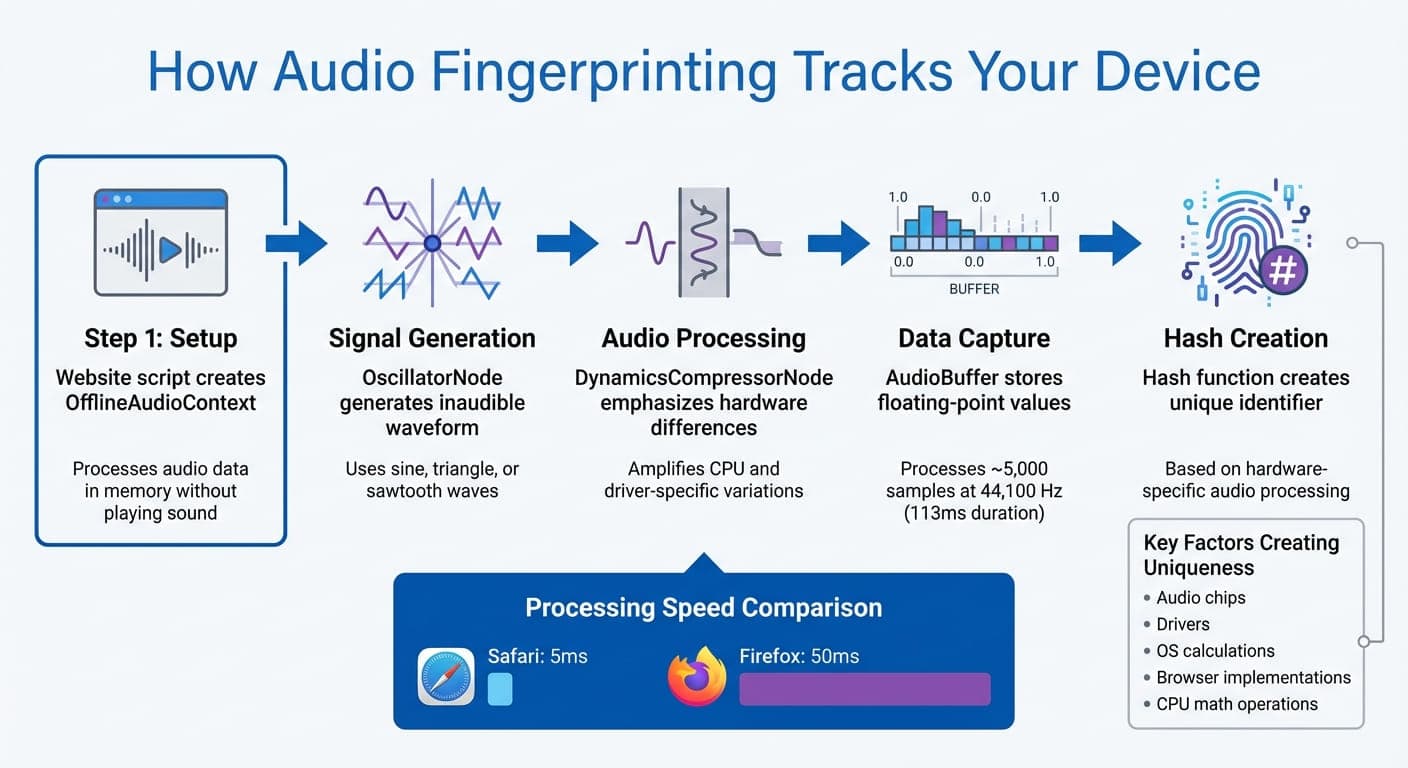
How Audio Fingerprinting Works: 5-Step Technical Process
Audio fingerprinting is a method of tracking users by analyzing subtle, hardware-specific differences in how devices process sound. Unlike cookies, it creates a digital signature based on the behavior of your device's CPU, audio drivers, and browser engine.
"Audio fingerprinting is a browser-based tracking technique that leverages the subtle differences in how each device processes sound to generate a unique identifier." – DataDome
This technique uses the Web Audio API and doesn’t require permissions like microphone or speaker access. It works discreetly in the background while you browse, making it a silent yet effective tracking tool.
The key to its effectiveness lies in its hardware dependency. Since the fingerprint is tied to the physical components of your device, it remains consistent across browsing sessions.
How Audio Fingerprinting Works
The process is surprisingly quick. A website script sets up an OfflineAudioContext, which processes audio data in memory without playing any sound. It generates an inaudible waveform using an OscillatorNode, often a sine, triangle, or sawtooth wave.
This signal is run through an audio chain, including a DynamicsCompressorNode, to emphasize hardware-specific differences. The processed audio data is stored in an AudioBuffer as an array of floating-point values. Finally, a hash function converts this array into a unique identifier.
The entire process can take as little as 5 milliseconds on Safari or up to 50 milliseconds on Firefox. Typically, it uses a sample rate of 44,100 Hz and processes about 5,000 samples, lasting around 113 milliseconds.
What makes audio fingerprints unique? Variations in audio chips, drivers, operating system calculations, and browser implementations all play a role. Even tiny differences in how CPUs handle math operations can result in distinct identifiers.
This combination of speed and precision makes audio fingerprinting a popular choice for platforms seeking reliable user identification.
Why Platforms Use Audio Fingerprinting
With third-party cookies being phased out, audio fingerprinting has gained traction as a way to track users, especially those managing multiple accounts. It offers several advantages:
- Stateless and persistent: Unlike cookies, audio fingerprints aren’t stored on your device. This makes them impossible to delete, providing consistent tracking across sessions, browsers, and even private modes.
- Stealthy operation: Since the Web Audio API doesn’t require permissions, the process runs invisibly in the background without triggering any user prompts.
- Cross-browser linking: Because the fingerprint is tied to your operating system and CPU architecture, platforms can link accounts accessed through different browsers on the same device. For example, if multiple accounts share the same audio hash but claim to belong to different users, it raises immediate red flags for fraud detection and policy enforcement.
In one study of 2,093 web users, researchers found only 95 distinct audio fingerprints. While this method may not be as diverse as others, it becomes highly effective when combined with additional tracking signals like canvas or WebGL fingerprinting.
Risks of Audio Fingerprinting for Multi-Account Users
If you manage multiple accounts on the same device, audio fingerprinting can cause big headaches. Platforms are getting better at spotting multi-account setups, and the hardware-based signature behind audio fingerprinting sticks around no matter how careful you are with privacy tools.
Account Linking and Bans
Platforms can link multiple accounts by detecting the same audio hash, which is tied to fixed hardware components like your CPU, sound card, and operating system.
"Security teams may flag mismatches between audio fingerprints and other device characteristics (e.g., if multiple sessions claim to be different users but share an identical audio hash)." – DataDome
Here’s the kicker: if one account gets banned, every account tied to that same audio fingerprint could also face restrictions or bans. Even switching browsers won’t help, as the fingerprint stays consistent across all browsers on the same machine.
This means not only are your accounts at risk of being collectively banned, but your privacy could also be compromised.
Privacy and Security Concerns
Audio fingerprints work quietly in the background, leaving no evidence on your device. Platforms use the Web Audio API to collect this data without ever asking for your permission.
What’s more alarming is that audio fingerprints can go beyond basic device identification. Research shows they might capture ambient audio, potentially leaking personal details. This opens the door for platforms to build detailed profiles of your online behavior without being upfront about what they’re collecting or how long they’re keeping it.
"Current audio fingerprints do not sufficiently protect privacy and should be used with great caution." – Moritz Pfister and Robert Michael, Researchers
Under regulations like GDPR, passive identifiers like audio fingerprints are increasingly classified as personal data when used for profiling. However, many platforms continue to use these methods without clearly disclosing their practices.
False Positives from Environmental Factors
The risks don’t stop at privacy or intentional tracking. The hardware-based nature of audio fingerprinting creates another problem: false positives.
Because audio fingerprints depend on hardware configurations, users with identical setups can end up being flagged as the same person. In a study of 2,093 web users, researchers found only 95 unique audio fingerprints, meaning many users shared the same signature.
This issue is even more pronounced in corporate settings. If employees use company-issued laptops with the same hardware and drivers, their audio fingerprints will be nearly identical. This could lead to mistaken account linking or restrictions.
Shared family devices add another layer of complexity. When multiple people use the same computer for their own accounts - whether for social media, e-commerce, or freelance work - platforms see one audio fingerprint and might assume a single person is violating their terms of service. Unfortunately, these systems can’t differentiate between legitimate users on the same device.
How Platforms Detect Multi-Accounts via Audio Fingerprinting
Platforms don't just gather audio fingerprints; they actively compare them across sessions to identify multi-account activity. For instance, when you log into multiple accounts on the same device, each session sends the same audio hash to the platform's servers. If the hashes match, the accounts are flagged as potentially linked to the same user.
This detection happens in milliseconds. As explained earlier, platforms utilize the Web Audio API to create a hardware-based signature using your device's audio processing components. Since this signature is derived from your device's specific hardware - like the CPU, audio chipset, and operating system - it remains consistent no matter which browser you use.
What makes this method so effective is its consistency across browsers. The hardware-based signature doesn’t change whether you're using Chrome, Firefox, or Safari. Even actions like clearing cookies, browsing in incognito mode, or switching your IP address won’t disrupt this link.
"Because audio fingerprints are not stored in local storage or cookies, they can link users across sessions, browsers, or even private modes." – DataDome
Platforms can link accounts almost instantly - sometimes even before a page fully loads. When paired with other device signals, audio fingerprinting can identify a browser with up to 99.6% accuracy. Now, let’s explore the specific parameters platforms use to evaluate multi-account risks.
Audio Fingerprint Parameters and Detection Risks
The Web Audio API provides various components that reveal unique details about your device. For example, the AudioContext exposes basic hardware capabilities, while the OscillatorNode and DynamicsCompressorNode highlight CPU-specific calculation differences and browser optimizations. Meanwhile, the AnalyserNode captures harmonic patterns through Fast Fourier Transform data, and sample rate settings reflect your hardware's limitations.
The real challenge lies in how platforms combine these parameters. Tiny rounding errors in how different CPUs handle IEEE 754 floating-point arithmetic accumulate across thousands of audio samples, creating a hash that’s essentially unique to your machine. Even if you share the same browser version with thousands of other users, your hardware configuration ensures your audio fingerprint stands out. Understanding these mechanisms is crucial for developing strategies to mitigate detection.
Solutions to Mitigate Audio Fingerprinting Risks
Platforms use audio fingerprinting to detect and link multi-accounts, but there are ways to protect yourself. The goal is to create distinct digital identities that platforms can't connect - even when analyzing your device's audio processing signature.
Using Anti-Detection Browsers
While VPNs and incognito modes can mask your IP and clear cookies, they don’t address your hardware signature. To tackle this, specialized browsers are designed to simulate hardware components, creating unique fingerprints for each profile.
For example, GoUndetected masks over 50 hardware parameters, generating a stable and unique audio fingerprint for every profile. It also syncs timezone, language, and geolocation settings with the proxy’s IP to avoid inconsistencies. Additional features like proxy testing and automatic failover ensure your real IP stays hidden, even if a proxy connection fails, reducing the risk of accidental account linking.
Profile Isolation and Proxy Usage
Each account should operate in a fully sandboxed environment where cookies, cache, and session data are entirely separate. This isolation prevents platforms from connecting accounts through shared browser data.
Pairing each profile with a unique residential or mobile proxy is also critical. The proxy’s location should align with the profile’s emulated timezone and language settings to avoid detection triggers.
"The only way to stop fingerprint-based bans is to separate accounts at the browser level." – Gayane G., Content Creator
GoUndetected makes this easier with integrated proxy management tools, ensuring seamless separation across all your profiles.
Fingerprint Scanning Tools
After setting up isolated profiles and proxies, it’s crucial to verify that your configurations are undetectable. Tools like Pixelscan, BrowserLeaks, or Whoer can help you test whether your spoofed fingerprint appears natural or raises red flags. These tools check parameters like WebGL, Canvas, and AudioContext outputs to ensure they’re masked and consistent.
If any parameter looks suspicious or randomized, platforms may flag your profile. With over 10,000 major websites actively using fingerprinting techniques, regular testing is essential to maintain a stable, natural-looking signature.
GoUndetected Features for Audio Fingerprint Protection
GoUndetected offers tailored tools to safeguard against audio fingerprinting, ensuring users can maintain privacy and security while managing multiple accounts.
To counter audio fingerprinting, GoUndetected masks over 50 browser parameters, including Audio Context, Canvas, and WebGL, creating unique and realistic fingerprints for each profile. This ensures that every account appears as if it’s being accessed from a completely different device. Cookies, storage, and fingerprint data are also kept isolated in sandboxed environments, effectively addressing the risks of fingerprint consolidation.
Separate Fingerprints Per Profile
Every time you set up a new profile, GoUndetected generates a unique, randomized fingerprint. By masking Audio Context, Canvas, and WebGL outputs, it prevents detection and ensures privacy. Built on Chromium, these features allow profiles to bypass tracking systems while remaining completely isolated from each other.
Advanced Multi-Account Management
GoUndetected enhances multi-account management with features like IP cloaking, WebRTC leak prevention, and automatic synchronization of timezone, language, and geolocation when proxies are assigned to profiles. It also secures session data using AES-256 encryption, offers an impressive 99.99% uptime, and includes tools like Session Locking and Bulk Profile Handling to simplify managing multiple accounts.
GoUndetected Plan Comparison for Multi-Account Users
Pick the plan that aligns with your needs for managing multiple accounts:
Plan | Price | Profile Limit | Key Features |
|---|---|---|---|
Basic | $39/mo | 50 | Core anti-detection, audio fingerprint spoofing, 24/7 support, no team members |
Team | $69/mo | 200 | All Basic features, team collaboration, smart folder management |
Agencies | $699/mo | Unlimited | All Team features, dedicated Slack channel, 24/7 personal support, unlimited profiles |
All plans come equipped with powerful audio fingerprint protection, proxy support, and auto-failover functionality. Users can also take advantage of a 7-day free trial, which doesn’t require a credit card. GoUndetected has earned strong ratings across platforms, including 4.8/5 on G2, 4.7/5 on Trustpilot, and 4.6/5 on Capterra, with users frequently praising its secure multi-account management capabilities. These plans make it easier than ever for users to implement robust anti-detection measures.
Conclusion
Audio fingerprinting poses a serious challenge for users managing multiple accounts, as it relies on hardware-level data that traditional privacy tools can’t mask. Major platforms like Amazon, Google Ads, and Facebook actively use this method to identify patterns. When multiple accounts share the same audio fingerprint, it often results in permanent bans. This highlights the need for more advanced solutions to protect against such vulnerabilities.
"The only way to stop fingerprint-based bans is to separate accounts at the browser level." - Multilogin
For businesses handling multiple social media, e-commerce, or advertising accounts, the covert nature of audio fingerprinting makes it especially risky. Studies show that limited diversity in fingerprints allows for highly efficient user identification.
Adopting privacy-focused tools has become essential for effective multi-account management. Tools like GoUndetected help mitigate these risks by creating isolated browser profiles with unique, stable audio fingerprints that replicate real user behavior. These profiles are further secured by concealing critical browser signals, reducing the chances of detection.
GoUndetected combines encryption and proxy support to deliver reliable multi-account protection. Advanced anti-detection measures are now crucial for ensuring the longevity and security of account operations.
FAQs
What is audio fingerprinting, and how can it affect users with multiple accounts?
Audio fingerprinting is a method used to track devices by analyzing unique features of their audio hardware and how they process sound signals. These features don’t change between sessions, making it possible for platforms to identify the same device, even if other identifiers like cookies or IP addresses are altered.
For those juggling multiple accounts, this can be risky. Platforms could potentially connect these accounts if they recognize the same audio fingerprint. To prevent this, it’s essential to use tools that create separate device fingerprints for each account and maintain strict session isolation.
How can I protect myself from audio fingerprinting when managing multiple accounts?
To minimize the risks of audio fingerprinting, there are a couple of practical steps you can take. First, consider disabling or restricting access to the Web Audio API in your browser settings. This API is commonly exploited to create unique audio signals that can be used for fingerprinting. Alternatively, some browser extensions are designed to block or limit audio processing features, offering an extra layer of protection.
Another effective option is using an anti-detection browser like GoUndetected. This tool provides features such as unique browser fingerprints, IP cloaking, and encrypted sessions. These capabilities make it easier to manage multiple accounts while reducing the likelihood of detection. By combining these strategies, you can significantly reduce the chances of being identified through audio fingerprinting.
How does audio fingerprinting impact users sharing devices?
Audio fingerprinting presents privacy concerns, especially for users sharing devices, as it can be used to identify and monitor individual behaviors. By analyzing unique audio signals from a device, this method generates a distinct fingerprint that could expose sensitive details or habits linked to specific users.
For individuals managing multiple accounts on shared devices, this type of tracking might inadvertently lead to privacy breaches or account detection. To address these risks, consider using tools designed to provide distinct browser fingerprints and strong anti-detection capabilities, which can help safeguard your privacy and ensure secure account handling.
Browse Undetected. Stay Private.
Unique browser fingerprints, built-in proxy support, and anti-detection technology. Try GoUndetected free for 7 days.
Available for macOS and Windows · No credit card required