
Best proxy browsers
Discover the best proxy browsers, how they work, key features to compare, proxy types, setup steps, and common mistakes to avoid for safer browsing and multi-account workflows.

If you’re searching for the best proxy browsers, you’re probably trying to solve one of three problems: manage multiple accounts safely, route traffic through different IPs, or reduce detection risk while browsing, scraping, or testing. The challenge is that not every proxy browser works the same way — and the wrong setup can lead to fingerprint mismatches, account flags, or wasted time on manual proxy configuration.
In this guide, we’ll break down what proxy browsers online actually are, how they differ from anonymous proxy browsers and antidetect browser platforms, and which options make sense for specific use cases like multi-accounting, ad verification, affiliate marketing, and data collection. We’ll also explain proxy types — including datacenter, residential proxy, and mobile proxy — so you can choose the right traffic route for your workflow.
Unlike articles that simply list browsers and extensions, this one focuses on decision-making: what to use, when to use it, and what tradeoffs to expect. You’ll see where proxy extensions help, where multiple browsers with proxies become unmanageable, and why browser fingerprinting often matters more than the IP address alone. In practice, the best setup is usually the one that keeps identity, network, and behavior aligned across every session, because that consistency is what reduces friction over time.
If you need a practical path forward, we’ll also show where GoUndetected.io fits naturally as a scalable antidetect browser option for teams and solo operators who want cleaner isolation, better control, and fewer setup headaches.
Proxy Browser Basics
A proxy browser combines a regular browser session with proxy routing and anti-fingerprinting controls, helping teams separate identities across accounts, regions, and workflows. In practice, it gives each profile a distinct network path and browser environment, so activity looks less like one operator and more like independent users. That matters whether you are logging into marketplaces, checking localized ads, or running repeatable QA tests across multiple regions.
What It Is
At a basic level, a proxy browser is a browser setup that masks the original IP address by sending traffic through a proxy server. For multi-account work, that matters because platforms often correlate logins by IP, device signals, cookies, and browser fingerprints—not just by username.
Tools like GoUndetected.io extend this idea by isolating profiles, so one account’s cookies, cache, and device data do not spill into another. That separation is the difference between simple IP masking and a more reliable operating environment. It also makes troubleshooting easier, because when one profile behaves oddly, you can isolate the issue to that profile instead of assuming the entire machine is compromised.
Why It Matters
Using only a proxy can reduce location-based tracking, but it does not fully solve account linkage. A browser that still leaks the same fingerprint can trigger risk checks, even if the IP changes. That is why proxy management and browser isolation need to work together.
- Reduces account cross-contamination between sessions
- Supports geo-targeted testing and localized content checks
- Improves workflow stability for teams managing many profiles
Core Uses
Proxy browsers are commonly used for e-commerce store management, affiliate marketing, ad verification, social media operations, and QA testing. Each use case depends on reliable profile separation and consistent proxy assignment. For example, a marketplace operator may need one profile per storefront, while a media buyer may need separate profiles for different ad accounts and regions.
| Use case | Why a proxy browser helps |
|---|---|
| Multi-account management | Keeps identities and sessions isolated |
| Geo-testing | Checks region-specific pages and pricing |
| Ad verification | Reviews placements from different locations |
| Affiliate operations | Separates offers, traffic sources, and logins |
For a deeper technical overview of browser fingerprinting, see Google’s browser management guidance and EFF’s primer on fingerprinting.
Top Features
These are the three features that matter most when you’re managing multiple accounts at scale: keeping sessions separated, making browser data believable, and moving profiles without breaking continuity. GoUndetected.io is built around that workflow, so each layer supports the next. The practical test is simple: if a browser saves time during setup, stays consistent during daily use, and reduces manual fixes when something changes, it is doing its job.
Isolation
Isolation keeps each account in a separate browser environment, reducing cross-contamination from cookies, local storage, cache, and login state. That matters when one mistake can link otherwise unrelated profiles and trigger checks.
With clean separation, teams can assign different workflows to different profiles and lower the risk of accidental overlap. Practical benefits include:
- Independent sessions for each account
- Less chance of shared data leaks
- Cleaner testing across markets, clients, or ad accounts
Fingerprint Control
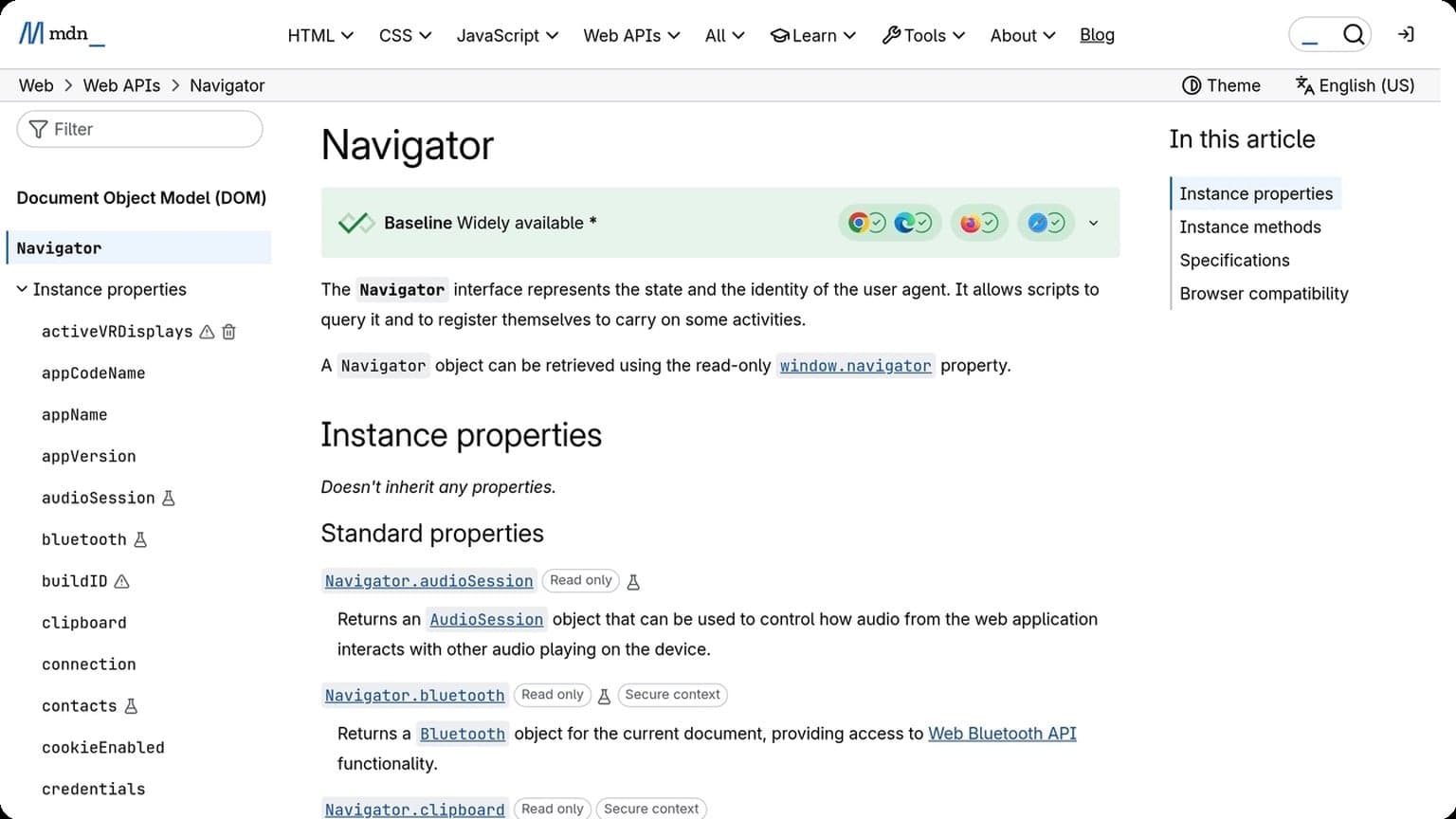
Fingerprint control helps align browser signals with the proxy or region you’re using. Modern platforms compare many data points at once, so a profile that looks “off” in just one place can stand out fast. For background on common browser signals, see the MDN Navigator docs.
GoUndetected.io lets you manage the key variables that influence trust, including core device and browser attributes. In practice, that means you can keep profiles consistent instead of relying on a generic setup that looks identical across accounts. That consistency is especially useful when you need to reopen the same account days later and want the session to look familiar rather than newly generated.
| Signal | Why it matters |
|---|---|
| User agent | Sets the browser identity seen by platforms |
| Timezone / locale | Should match the account’s region |
| Canvas / WebGL | Helps reduce obvious fingerprint mismatches |
Profile Sync
Profile sync makes it easier to keep teams aligned without manually rebuilding every browser setup. Instead of duplicating work, you can standardize profiles, move them across devices, and preserve the settings that matter most.
That saves time during onboarding, scaling, and recovery. It also reduces errors, because a synced profile is less likely to drift from the original configuration. For operators who need reliable multi-account workflows, that consistency is a major advantage. It is also useful when a team member changes machines, because the profile can be restored without rebuilding the entire environment from scratch.
Proxy Types
Choosing the right proxy type is one of the fastest ways to improve account stability, session consistency, and geo-targeting accuracy. For multi-account workflows, the goal is not just “getting an IP,” but matching the proxy profile to how a real user would browse.
Residential
Residential proxies route traffic through ISP-assigned home connections, so they look like normal consumer users. That makes them a strong fit for signups, logins, ad verification, and other tasks where platform trust matters more than raw speed.
They are usually the most reliable option for reducing challenge pages and soft blocks, but they tend to cost more and can vary in speed. Best practice is to keep one proxy per account and align location, language, and browser fingerprint for consistency.
Datacenter
Datacenter proxies come from cloud or hosting providers, not residential networks. They are typically fast, scalable, and budget-friendly, which makes them useful for bulk testing, scraping low-friction sites, and internal QA workflows.
The tradeoff is detection risk: many platforms can identify datacenter IP ranges quickly. Use them when speed and volume matter more than stealth, and avoid pairing them with high-trust actions on sensitive accounts.
Mobile
Mobile proxies use IPs assigned by cellular carriers, often appearing highly trustworthy because they are shared across real mobile networks. They can be especially effective for social platforms, marketplaces, and mobile-first apps.
They are usually the most expensive option, but they can offer strong reputation and rotation flexibility. For long-lived accounts, mobile proxies are often the safest choice when the workflow depends on looking максимально human.
| Proxy type | Best for | Main tradeoff |
|---|---|---|
| Residential | Stealth, signups, account management | Higher cost, variable speed |
| Datacenter | Volume, testing, fast automation | Higher detection risk |
| Mobile | High-trust platforms, long sessions | Most expensive |
Selection Criteria
Choosing an antidetect browser for multi-account workflows comes down to measurable performance, not marketing claims. The best option should keep sessions fast, protect fingerprints, and stay reliable under daily use across teams, proxies, and high-volume account sets.
Speed
Speed affects everything from profile launch time to how quickly your team can switch between accounts. In practice, look for low startup latency, smooth tab handling, and minimal lag when loading heavy web apps or dashboards.
Fast tools also reduce operational friction. If a browser slows down during proxy checks, cookie imports, or repeated profile switching, small delays compound across dozens of accounts.
- Quick profile creation and launch
- Low memory usage under multiple sessions
- Stable performance with automation or extensions
Privacy
Privacy is the core value of an antidetect browser, but it should be evaluated on how well it isolates identities. Strong fingerprint control, clean profile separation, and proxy compatibility matter more than surface-level privacy claims.
Check whether the browser supports consistent canvas, WebGL, timezone, and user-agent settings, and whether it avoids leaking cross-profile data. For reference, browser fingerprinting is widely documented by privacy researchers, including the EFF’s Cover Your Tracks project.
| Privacy factor | What to verify |
|---|---|
| Fingerprint isolation | Separate, consistent identity per profile |
| Proxy support | Reliable IP matching and session routing |
| Data separation | No shared cookies, cache, or local storage |
Stability
Stability determines whether your workflow holds up over time. A browser may look good in a demo, but if profiles crash, sync breaks, or updates disrupt fingerprints, it becomes a liability.
Prioritize tools with consistent releases, clear documentation, and responsive support. If you want a practical benchmark, test the browser across several days with the same account set, then compare crash rate, session persistence, and recovery speed after reconnects.

Setup Steps
A clean setup determines whether your multi-account workflow is stable or constantly fighting fingerprint mismatches. The goal is simple: install the browser, align your profile settings with your proxy and use case, then verify everything before scaling.
Install
Download GoUndetected.io from the official site and complete the installer for your operating system. Use the latest version so you get current fingerprint controls, profile management fixes, and compatibility updates.
After installation, sign in and create your first workspace. If you manage multiple clients or brands, separate them from the start so cookies, sessions, and browser data do not overlap.
Configure
Build each profile around a single identity: one account, one proxy, one consistent browser environment. Match the proxy region to the target platform, then set language, timezone, and WebRTC behavior to reduce obvious mismatches.
- Assign a unique proxy per profile.
- Set timezone, locale, and language to match the proxy location.
- Keep hardware and screen settings consistent across repeat logins.
- Rename profiles by client, channel, or campaign for fast sorting.
For proxy guidance and setup details, review the GoUndetected documentation and your provider’s connection notes before launching high-value accounts.
Test
Before logging into a real account, run a quick fingerprint check and open the target platform in a fresh profile. Confirm that the IP, timezone, and browser signals all align; a mismatch here often explains early verification flags.
| Check | What to verify |
|---|---|
| IP | Matches proxy country and city |
| Timezone | Aligned with the proxy region |
| Fingerprint | No obvious leaks or duplicate signals |
If the test profile loads cleanly, save it and reuse the same configuration pattern for future accounts. That repeatability is what keeps operations efficient at scale.
Common Mistakes
Even strong multi-account systems fail when small operational mistakes create a clear pattern. The three issues below are the most common: identity leaks, browser overload, and weak proxy rotation. Fixing them early reduces bans, support checks, and wasted setup time.
Leaks
Leaks happen when one account can be linked to another through shared data points: IP, cookies, device signals, timezone, or language. A single mismatch may not trigger action, but repeated inconsistencies make the profile easier to flag.
Keep each profile isolated and verify the full stack before logging in. Use separate proxies, avoid copying browser state, and check that fingerprint settings match the account’s target region.
- Never reuse cookies or sessions across profiles
- Match timezone, locale, and proxy geography
- Test for exposed WebRTC or DNS signals
Overload
Running too many accounts from one machine is a reliability problem as much as a detection problem. When tabs, extensions, and automation scripts pile up, performance drops and login timing becomes inconsistent.
Keep profiles lean. Disable unnecessary extensions, separate heavy workflows, and monitor memory use so each account behaves like a normal user session instead of a stressed browser environment.
| Load Factor | Risk | Better Practice |
|---|---|---|
| Many active profiles | Slower launches, crashes | Stagger sessions |
| Too many extensions | Fingerprint noise | Use only essentials |
Bad Rotation
Proxy rotation is useful only when it follows a consistent rule. Random switching between countries, ASNs, or IP quality levels can look more suspicious than staying on one stable route. For platform guidance, review the relevant help center or technical docs, such as Google’s documentation for account and access behavior.
Rotate intentionally: keep one account on one proxy identity, change IPs only when needed, and prefer clean residential or mobile sources when the task requires realism. A stable pattern is usually safer than frequent “optimization.”
In short, the best proxy browser is the one that matches your workflow, keeps identities separated, and stays consistent enough to avoid unnecessary risk. If you need a practical antidetect browser for multi-account management, GoUndetected.io gives you the control, isolation, and profile structure to scale with less manual effort and fewer surprises.
Need more hands-on playbooks? Read Incogniton vs GoLogin, Hidemium vs AdsPower, and How to Choose an Anti-Detection Browser for Web Scraping and Data Collection.
Browse Undetected. Stay Private.
Unique browser fingerprints, built-in proxy support, and anti-detection technology. Try GoUndetected free for 7 days.
Available for macOS and Windows · No credit card required