
Browser Fingerprinting vs. IP Cloaking: Key Differences
Compare browser fingerprinting and IP cloaking: how they work, key detection differences, and why combining both protects multi-account management.

Browser Fingerprinting vs. IP Cloaking: Key Differences
If you're managing multiple accounts online, understanding browser fingerprinting and IP cloaking is essential. These two methods help protect your identity but in very different ways:
- Browser Fingerprinting: Tracks unique details about your device (like screen resolution, fonts, GPU, and browser settings) to create a persistent identifier. Even with a VPN or incognito mode, this identifier remains consistent.
- IP Cloaking: Hides your IP address by routing your traffic through proxies, VPNs, or the Tor network. This masks your location but doesn’t affect device-level data.
Platforms like Facebook and Amazon use both methods to detect linked accounts. If your IP and device fingerprint don’t match, you risk bans. Combining both techniques - IP cloaking for location masking and fingerprint spoofing for device disguise - offers the best protection.
Quick Comparison
Feature | Browser Fingerprinting | IP Cloaking (VPN/Proxy) |
|---|---|---|
Focus | Device/Browser settings | Network/Location (IP address) |
Persistence | High (Hard to change) | Low (Switchable) |
Detection | Statistical anomalies | IP reputation checks |
Best Use | Preventing device-based linking | Hiding geographic location |
Key Takeaway: To stay undetected while managing multiple accounts, use both methods together. Tools like GoUndetected can simplify this process by syncing your IP and fingerprint settings.
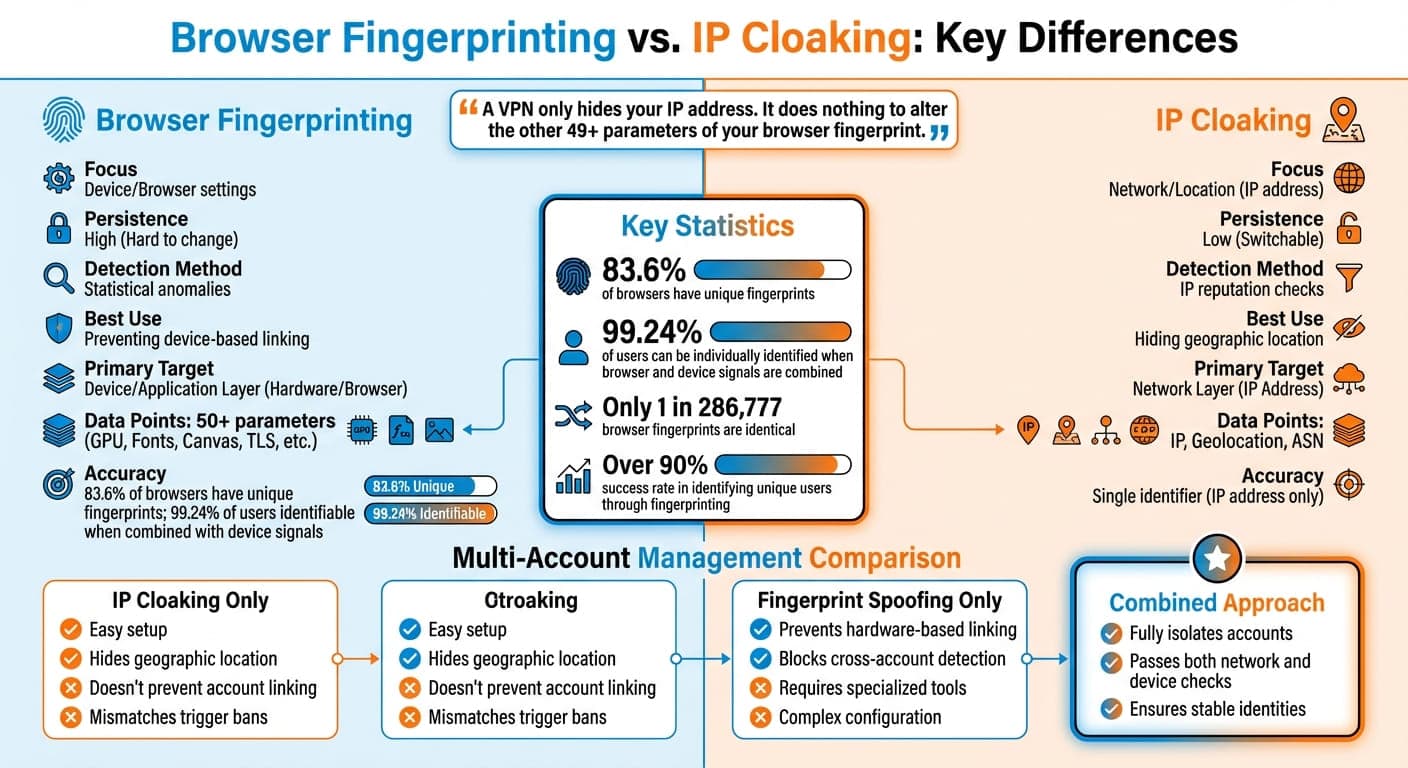
Browser Fingerprinting vs IP Cloaking: Complete Technical Comparison
How to mitigate fingerprinting and IP leaks using Firefox advanced preferences (see change log)
What Is Browser Fingerprinting?
Browser fingerprinting is a tracking method that identifies users by collecting unique details from their browser, device, and operating system - without relying on cookies. It works by analyzing built-in system features, which makes it nearly impossible to erase or modify its effects.
Here’s how it works: while individual characteristics like screen resolution might not say much on their own, combining multiple data points - such as your GPU model, installed fonts, time zone, and browser version - creates a highly specific profile. Studies reveal that 83.6% of browsers have a unique fingerprint, and when both browser and device signals are considered together, 99.24% of users can be individually identified.
What makes fingerprinting so persistent is its reliance on hardware and software configurations that don’t change when you clear cookies, use Incognito mode, or even connect via a VPN. As the Electronic Frontier Foundation (EFF) explains:
"Fingerprinting creates a string that can't be cut by creating a new persistent identifier".
How Browser Fingerprinting Works
Fingerprinting collects data in layers, often starting before a webpage fully loads. Here’s a breakdown of the process:
- Transport Layer: During the TLS handshake, a JA3 hash is generated in about 150 milliseconds - before JavaScript even runs.
- Browser Signals: Your browser automatically sends details like the User-Agent string (revealing browser version and operating system), language preferences, and HTTP headers with every request.
- JavaScript APIs: Websites use browser functions to gather detailed hardware and software data. For example, they can identify your GPU model using WebGL, count your CPU cores through the Hardware Concurrency API, or assess device memory. Canvas fingerprinting, a common method, instructs your browser to render a hidden image, and subtle differences in how GPUs and drivers handle the task produce a unique hash.
- Behavioral Analysis: Patterns like mouse movements, typing speed, and scrolling behavior are tracked to distinguish real users from bots.
These pieces of data are then combined and hashed into a unique identifier that remains consistent across sessions - even when privacy tools are in use.
Why Browser Fingerprinting Is Used
Browser fingerprinting is widely used for tracking, targeted advertising, and fraud prevention.
For advertisers, it offers a way to track users who block cookies or use privacy tools. Since it works across sessions and devices, fingerprinting can connect activity on a laptop to behavior on a smartphone.
In fraud detection, this technology helps identify account takeovers or suspicious activity. For example, banks or e-commerce platforms might require multi-factor authentication if a login attempt comes from an unfamiliar fingerprint. However, this ability to track users so accurately creates challenges for professionals managing multiple accounts. Platforms like Facebook, TikTok, and Amazon can easily flag unusual patterns, leading to account restrictions or permanent bans.
Fingerprinting is highly accurate, with over 90% success in identifying unique users. In fact, only about 1 in 286,777 browser fingerprints are identical.
What Is IP Cloaking?
IP cloaking, also known as IP spoofing or masking, is a method used to hide your actual IP address by substituting it with a different one. This technique helps protect your privacy, maintain anonymity, and bypass location-based restrictions imposed by platforms that monitor user activities based on IP data.
Your IP address reveals critical details such as your location (country and city) and your Internet Service Provider (ISP). Platforms often leverage this information to flag and limit certain account activities.
IP cloaking works by routing your internet traffic through an intermediary server. This process ensures that the website you’re accessing sees the server’s IP address instead of your own.
"A proxy serves as an intermediary between a device and the internet, masking its IP address and cloaking its digital footprint to enhance anonymity." - Sandra Anderson, DICloak
How IP Cloaking Works
The three most common methods for IP cloaking are proxy servers, VPNs, and the Tor browser. While they function differently, they all achieve the same goal: hiding your real IP address.
- Proxy servers act as intermediaries between you and the websites you visit. The website only sees the proxy server's IP address. There are different types of proxies, each offering varying levels of anonymity:
- Residential proxies use IP addresses assigned to home internet connections, making your activity appear as if it’s coming from a regular household.
- Mobile proxies route traffic through mobile carrier networks (4G/5G). These often share IP pools among multiple users, blending your activity with legitimate mobile traffic.
- Datacenter proxies use IPs from hosting providers. They’re fast and affordable but are more likely to be flagged as non-human traffic.
- VPNs encrypt your internet traffic and route it through a remote server, replacing your public IP address with the VPN server's IP. While VPNs provide device-wide IP masking, they don’t address browser fingerprinting, which is why many professionals use undetected browsers for multi-accounting.
- The Tor browser takes anonymity to the next level. It routes your traffic through multiple layers of nodes, each with its own encryption, making it extremely difficult to trace your original IP. However, this added security often comes at the cost of speed.
Method | Anonymity Level | Speed | Best Use Case |
|---|---|---|---|
Datacenter Proxy | Low to Medium | High | Web scraping, high-speed tasks |
Residential Proxy | High | Medium | Multi-account management, e-commerce |
Mobile Proxy | Very High | Medium | Social media marketing, bypassing blocks |
VPN | Medium to High | High | General privacy, bypassing geo-blocks |
Tor | Very High | Low | Extreme anonymity, non-commercial use |
Common Uses of IP Cloaking
IP cloaking goes beyond just safeguarding privacy. It’s particularly useful for professionals managing multiple accounts. By assigning each account a unique proxy IP tied to a specific browser profile, IP cloaking helps create distinct digital identities, ensuring platforms can’t link accounts together.
Businesses also rely on IP cloaking to bypass geo-restrictions. Using IPs from specific regions allows them to access localized content, conduct market research, run targeted ad campaigns, or access region-locked services.
Additionally, IP cloaking can help bypass anti-fraud systems. Platforms often monitor for suspicious activity, such as numerous requests originating from the same IP address. Rotating or dedicated proxies make automated actions appear as legitimate traffic from multiple users. However, while IP cloaking is effective, it cannot fully counter advanced browser fingerprinting techniques.
Browser Fingerprinting vs. IP Cloaking: Technical Comparison
IP cloaking works by hiding your public IP address, typically through a proxy or VPN, while browser fingerprinting collects over 50 technical details from your device to create a unique identifier.
The detection process begins early - during the TLS handshake - well before JavaScript executes. IP cloaking is flagged during the initial connection request using IP reputation databases and ASN (Autonomous System Number) checks.
"Browser detection now happens at the transport layer - before JavaScript even runs. By the time your page loads, platforms have already evaluated your browser's TLS handshake, HTTP/2 behavior, and protocol signatures." - Chameleon Mode
These two tracking methods rely on entirely different mechanisms. IP cloaking focuses on a single identifier: your IP address. In contrast, browser fingerprinting builds a composite identifier using data points like Canvas rendering, WebGL signatures, AudioContext, and even installed fonts. This makes fingerprinting much harder to evade - it works even if you change your IP, clear cookies, or browse in incognito mode.
Feature | IP Cloaking (VPN/Proxy) | Browser Fingerprinting |
|---|---|---|
Primary Target | Network Layer (IP Address) | Device/Application Layer (Hardware/Browser) |
Data Points | IP, Geolocation, ASN | 50+ (GPU, Fonts, Canvas, TLS, etc.) |
Persistence | Low (Changes with server switch) | High (Survives IP changes and cookie clearing) |
Detection Method | IP Reputation/Blacklists | Statistical Anomaly Detection/Cross-referencing |
Data Collection Methods Compared
When you use a VPN or proxy, platforms only see network-level data: your masked IP address, geolocation, and the ASN of the server you're using. This limited scope is why datacenter IPs are often flagged - ASNs reveal that these IPs are not tied to residential connections.
Browser fingerprinting, on the other hand, dives much deeper. It collects hardware details like your GPU model and screen resolution, software configurations such as installed fonts and system language, and browser-specific features like Canvas rendering and WebGL capabilities. Studies show that 83.6% of browsers have a unique fingerprint, and when combined with device-level data, 99.24% of users can be uniquely identified.
"A VPN only hides your IP address. It does absolutely nothing to alter the other 49+ parameters of your browser fingerprint. Your unique combination of GPU, screen resolution, fonts, and browser settings remains completely exposed." - Joanna Ok., Content Writer, Multilogin
Discrepancies between network geolocation and device-level attributes can also trigger detection. This contrast highlights the deeper data layers fingerprinting relies on compared to IP cloaking.
Persistence and Detection Resistance
The differences in data collection directly affect how persistent each method is. IP cloaking is inherently temporary - you can easily switch your IP address by connecting to a new VPN server or proxy. While this allows for quick identity rotation, your anonymity hinges on maintaining that connection.
Browser fingerprinting, however, is far more consistent. Unless you physically alter your hardware or use advanced spoofing tools, your fingerprint remains the same across browsing sessions. Clearing cookies or using incognito mode won't erase it.
Platforms have also advanced detection techniques, analyzing encrypted handshake details like cipher suites and protocol versions during the TLS/HTTP/2 handshake. This process generates a JA3 hash, enabling identification even before a webpage fully loads.
Differences in Multi-Account Management
Managing multiple accounts goes beyond just masking your network activity - it requires a strategy that addresses both IP cloaking and fingerprinting to avoid detection and bans. Why? Because platforms like Meta, TikTok, and LinkedIn use advanced fingerprinting techniques to connect accounts, and simply rotating VPN servers won’t fool them. Your device fingerprint - made up of over 50 parameters - acts like a digital ID, and IP cloaking alone can’t hide it.
The risk of detection varies significantly depending on your approach. For example, relying solely on a VPN can raise red flags when there’s a mismatch between your IP location and your device settings. Imagine your IP shows you’re in Singapore, but your browser’s timezone, language, and hardware details point to Ohio. Platforms instantly flag these inconsistencies. In contrast, fingerprint spoofing creates the illusion of separate devices, making each account appear completely independent - not just in location, but in identity.
"Using a VPN is like wearing a mask but keeping your unique uniform, voice, and gait. Anyone who knows you will still recognize you instantly." - Joanna Ok., Content Writer and Marketing Strategist, Multilogin
Pros and Cons for Multi-Account Use
Method | Advantages | Disadvantages |
|---|---|---|
IP Cloaking Only | Easy setup; hides geographic location; bypasses basic IP blocks | Doesn't prevent account linking; mismatches trigger bans; identical fingerprints for all accounts |
Fingerprint Spoofing | Prevents hardware-based linking; makes one device appear as many; blocks cross-account detection | Poorly configured setups get flagged; requires specialized anti-detection tools and expertise |
Combined Approach | Fully isolates accounts; ensures stable identities; passes both network and device checks | Complex setup; needs regular updates to match browser versions |
Challenges and Best Practices
To avoid detection, you need to address two key challenges: IP consistency and fingerprint stability.
With IP cloaking, consistency is critical. Your proxy’s location must align perfectly with your browser’s timezone, language, and WebRTC settings. Any mismatch here is a major red flag for fraud detection systems. Using residential or mobile proxies instead of datacenter IPs can help, as platforms tend to trust these more - they’re tied to real users, not automated systems.
For fingerprinting, resist the urge to randomize too much. Platforms look for stability, and frequent changes to hardware signals - like switching from an NVIDIA GPU to an AMD one - are highly suspicious. Real users don’t constantly change screen resolutions or hardware setups. Instead, aim for a steady, natural-looking fingerprint for each account. This means keeping elements like Canvas rendering, WebGL signatures, and font lists consistent across all sessions for a specific profile.
The best results come from combining both methods. Each account should operate in its own isolated environment, complete with unique cookies, local storage, and hardware emulation that remains stable over time. This approach minimizes the risk of a "chain ban", where one flagged account leads to the suspension of all connected profiles.
Why Combine Browser Fingerprinting Spoofing and IP Cloaking?
Pairing browser fingerprint spoofing with IP cloaking tackles vulnerabilities on both the network and device levels.
IP cloaking hides your physical location, while fingerprint spoofing disguises your device identity. When used alone, each method has limitations. Platforms often analyze both factors simultaneously, and mismatched signals can raise red flags, potentially putting your accounts at risk.
Most users can still be identified when browser and device fingerprints are combined. For instance, rotating IPs without altering your fingerprint leaves your device exposed. This is why platforms can link accounts even when you’re using a VPN.
"A VPN hides where you are. An antidetect browser hides what device you are. These solve different problems and are typically used together, not as alternatives." – Chameleon Mode
The key lies in synchronization. When both methods are aligned, your browser’s settings - like timezone, language, and WebRTC parameters - match your proxy’s geographic location. For example, using a German IP with U.S. timezone settings is a red flag. But when everything aligns, you blend seamlessly into the pool of ordinary users.
This strategy is especially important for professionals managing multiple ad accounts, e-commerce platforms, or social media profiles. Tools like GoUndetected automate this synchronization, masking over 50 browser parameters and assigning each profile a dedicated proxy. This ensures every account appears to originate from a unique device and location, meeting platform expectations.
Improved Privacy and Detection Resistance
Using both methods together addresses one of the main ways platforms link accounts - through networks of connected device signals. If your fingerprints remain unchanged, new accounts can be linked back to banned profiles. On the other hand, mismatched fingerprints and IP data can trigger alerts for account farms.
Consistency is crucial. Stable fingerprints paired with matching IP locations reduce the risk of cross-account linking. This dual-layer approach is especially vital for users managing multiple accounts, as it minimizes detection risks.
Detection systems have grown more advanced, moving beyond JavaScript analysis to examine TLS fingerprints. These fingerprints, generated during your SSL/TLS handshake, reveal unique data before any webpage loads. This means simple browser extensions won’t cut it. Effective tools must manage both transport-layer elements (like IP and TLS) and application-layer details (like browser fingerprints) simultaneously.
The results are clear. While 83.6% of browsers have unique fingerprints that persist across sessions, combining fingerprint spoofing with IP cloaking significantly lowers your uniqueness score. This makes your setup blend into common configurations rather than standing out.
Tools That Integrate Both Methods
GoUndetected is a platform built for this dual-layer approach. Each profile gets a unique fingerprint and dedicated proxy, ensuring that device data aligns perfectly with the IP location. The tool automatically syncs timezone, language, and WebRTC settings to match the proxy’s geographic location, eliminating mismatches that could trigger fraud alerts.
The platform masks over 50 browser parameters and supports residential, mobile, and datacenter proxies. You can assign a dedicated IP to each profile, ensuring complete separation between accounts. Starting at $39/month for 50 profiles, it’s tailored for social media managers, advertisers, and e-commerce sellers looking to scale without detection risks.
The effectiveness of this integrated approach is reflected in user feedback. With ratings of 4.8/5 on G2, 4.7/5 on Trustpilot, and 4.6/5 on Capterra, GoUndetected has proven its value across various industries. One user shared:
"The level of anonymity is unparalleled. I can manage multiple client accounts without ever worrying about being traced. A game-changer for my agency."
Conclusion
Browser fingerprinting and IP cloaking tackle different parts of your online identity. While IP cloaking hides your network location, browser fingerprinting exposes your device’s unique setup. If used separately, both approaches leave gaps in your defenses. Platforms today analyze both network data and consistent browser fingerprints, which remain unchanged even if your IP address shifts.
This dual-layer analysis is what makes managing multiple accounts so tricky. For instance, using a VPN without altering your fingerprint allows platforms to connect various IPs back to the same device. On the flip side, spoofing your fingerprint but pairing it with an inconsistent IP - like a U.S.-based browser operating through a German network - can trigger fraud detection systems. That’s why aligning these elements is critical for secure and reliable account management.
The best solution is to combine both techniques. When your browser’s timezone, language, and WebRTC settings match your proxy’s location, you blend in with ordinary users. This synchronization is what sets apart seasoned professionals from those who get flagged and banned. The key takeaway here? A coordinated strategy is essential to bypass advanced detection systems.
For those juggling multiple social media accounts, e-commerce platforms, or ad campaigns, tools like GoUndetected simplify this process. Starting at $39/month for 50 profiles, the platform adjusts over 50 browser parameters while ensuring each profile uses a proxy tailored to its fingerprint. With ratings of 4.8/5 on G2, 4.7/5 on Trustpilot, and 4.6/5 on Capterra, it’s clear that GoUndetected delivers results across various industries.
FAQs
Can I be tracked even if I use a VPN and Incognito mode?
Yes, even when using a VPN and Incognito mode, tracking remains possible through browser fingerprinting. This technique gathers unique details about your setup, such as fonts, graphic capabilities, and device-specific behaviors. These signals create a distinct "fingerprint" that's hard to hide. While VPNs and Incognito mode can improve your privacy, they don't completely block advanced tracking methods like fingerprinting.
What settings must match my proxy location to avoid detection?
Properly aligning your proxy settings with the geographic region of your IP address is crucial to avoid detection. When the proxy location and IP address don't match, it can raise red flags and make detection more likely. Additionally, configuring your proxy to align with your target location helps minimize latency. This is especially important if you're managing multiple accounts or automating tasks, as it ensures smoother performance while reducing the chances of triggering detection systems.
How often should I change a browser fingerprint for each account?
To reduce detection risks and keep your activities under the radar, it's important to update your browser fingerprint regularly. Ideally, this should be done for every new session or on a set schedule, like daily. Tools such as GoUndetected make this process easier by creating unique fingerprints for each profile you use. Pairing frequent fingerprint updates with IP cloaking and session isolation adds an extra layer of security, helping you manage multiple accounts without raising red flags.
Browse Undetected. Stay Private.
Unique browser fingerprints, built-in proxy support, and anti-detection technology. Try GoUndetected free for 7 days.
Available for macOS and Windows · No credit card required