
How to Automate Multi-Account Management with Proxies
Automate and protect dozens of accounts by pairing unique proxies with anti-detect browser profiles to avoid bans and scale workflows.

How to Automate Multi-Account Management with Proxies
Managing multiple accounts on platforms like Facebook, Amazon, or LinkedIn can be tricky. Platforms track over 50 digital identifiers, including IP addresses, device fingerprints, and even browser settings, to detect suspicious activity. If you're not careful, this can lead to account bans and disruptions.
To avoid detection and streamline workflows, combining proxies with anti-detect browsers is key. Proxies assign unique IPs to each account, while anti-detect browsers like GoUndetected create separate device fingerprints for each session. Together, they make each account appear as if it's being accessed from a different location and device.
Here’s what you need to know:
- Proxies: Residential proxies are reliable for most tasks, while mobile proxies excel on high-security platforms like TikTok or Meta.
- Anti-Detect Browsers: Tools like GoUndetected randomize browser fingerprints and isolate data to prevent cross-account tracking.
- Automation: APIs and scripts can handle repetitive tasks, saving time and improving efficiency.
Why Proxies and Anti-Detect Browsers Matter for Automation
Anonymity and Security Risks
Your IP address is like a digital fingerprint - it’s how platforms keep tabs on user behavior, enforce location-based settings, control request limits, and flag suspicious activity. If you’re running 50 accounts from the same IP, it’s a dead giveaway that they’re all coming from one source. This can lead to chain bans, where all linked accounts are suspended at once. Standard browsers just don’t cut it when it comes to avoiding detection.
How Proxies Improve Account Management
Proxies step in by assigning a unique IP address to each browser profile, making it look like every account is logging in from a completely different location. This is crucial for managing multiple accounts efficiently and securely. Residential proxies are particularly effective because they route traffic through real home internet connections - think providers like AT&T or Verizon. These IPs are nearly impossible to distinguish from actual user traffic, unlike datacenter proxies, which often come from server farms and are more likely to be flagged as automated. High-quality residential proxy services also maintain consistent sessions, reducing the risk of triggering security alerts.
Anti-Detect Browsers and Browser Fingerprints
Using proxies alone isn’t enough. Platforms track more than 50 digital identifiers - things like Canvas, WebGL, Audio Context, screen resolution, and even hardware details - to create a device fingerprint. Anti-detect browsers, such as GoUndetected, help by masking and randomizing these identifiers, making each browser profile look like it’s running on a completely different device.
GoUndetected takes it a step further by syncing each profile’s timezone, language, and WebRTC geolocation with the location of the assigned proxy. This eliminates any data mismatches that might raise red flags. Plus, each profile operates in a fully isolated environment, keeping cookies, local storage, and cache completely separate. This ensures accounts stay siloed, preventing cross-account tracking. When you combine unique IPs with randomized fingerprints, you get a solid setup for seamless and secure automation.
Selecting Proxies for Multi-Account Workflows
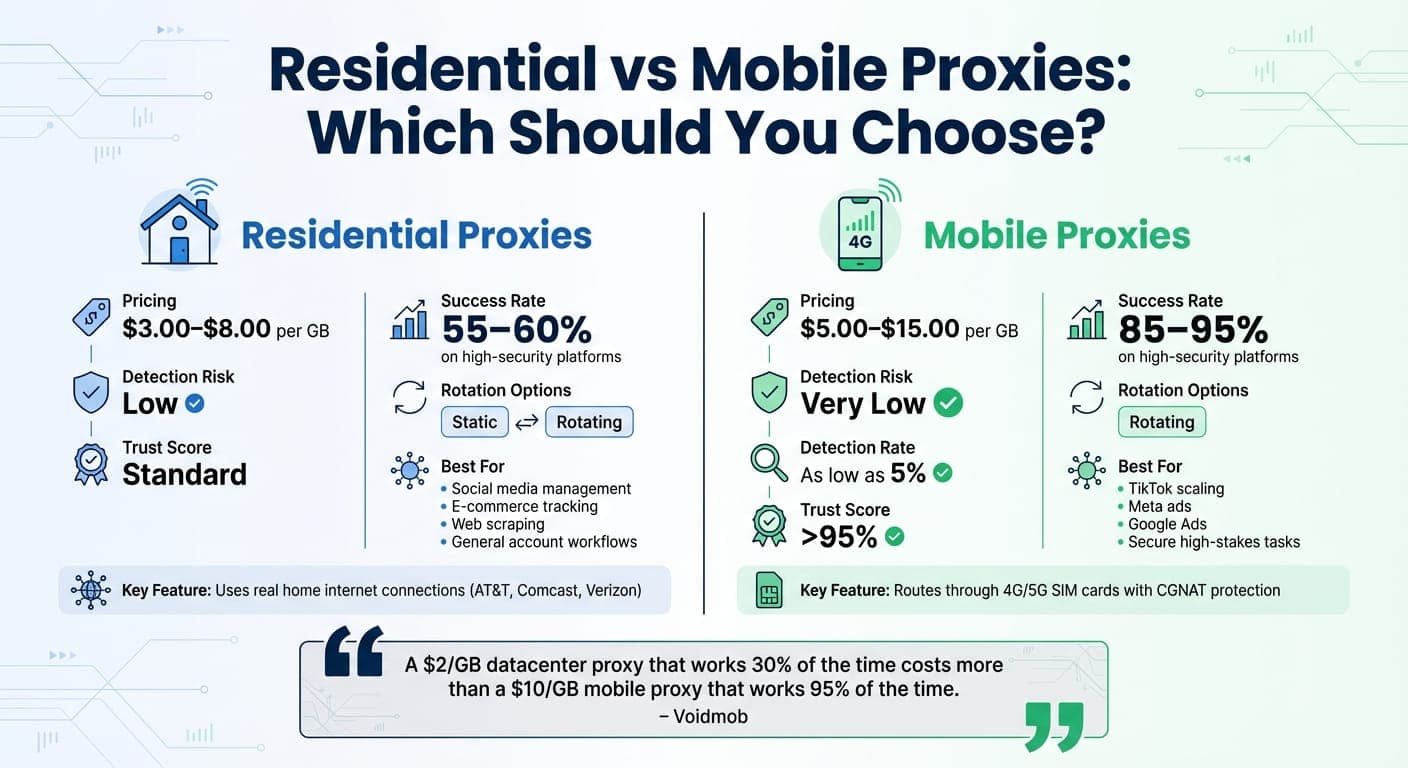
Residential vs Mobile Proxies: Pricing, Detection Risk, and Use Cases Comparison
Residential Proxies vs. Mobile Proxies
The type of proxy you choose can make or break your account management efforts. Residential proxies use real home internet connections provided by major ISPs like AT&T, Comcast, or Verizon. These proxies are widely accepted across platforms and are well-suited for activities like social media management, e-commerce tracking, and general account workflows. On platforms with stricter protections, residential proxies typically achieve success rates of around 55–60%.
On the other hand, mobile proxies take reliability to the next level. They route traffic through SIM cards on 4G or 5G networks, boasting success rates of 85–95% on even the most secure platforms. Thanks to Carrier-Grade NAT (CGNAT), thousands of users share a single IP address, making it harder for platforms to block them without affecting legitimate users. This setup gives mobile proxies a trust score exceeding 95% and detection rates as low as 5%.
"A $2/GB datacenter proxy that works 30% of the time costs more than a $10/GB mobile proxy that works 95% of the time."
– Voidmob
Type | Pricing (per GB) | Detection Risk | Rotation Options | Use Cases |
|---|---|---|---|---|
Residential Proxies | $3.00–$8.00 | Low | Static or Rotating | Social media, e-commerce, web scraping |
Mobile Proxies | $5.00–$15.00 | Very Low | Rotating | TikTok scaling, Meta ads, secure tasks |
For most workflows, residential proxies strike a solid balance between cost and reliability. But if you're working on high-security platforms like TikTok, Meta, or Google Ads, investing in mobile proxies can be a smarter move. Once you've chosen a type, evaluate providers carefully to ensure they meet your specific automation needs.
What to Look for in a Proxy Provider
When selecting a proxy provider, focus on those with large, high-quality IP pools - aim for over 30 million IPs with 99.99% uptime. This minimizes the risk of fraud detection. Be cautious with budget providers, as they often have up to 30% of their IPs blacklisted by services like Spamhaus.
Location coverage is another critical factor. If your workflow requires localized content or region-specific ad verification, ensure the provider offers proxies from at least 150 countries with options for city-level targeting.
Support for multiple protocols is essential. For anonymity, prioritize SOCKS5, as it doesn’t alter HTTP headers. Additionally, ensure the provider integrates with tools like GoUndetected and supports secure authentication methods such as IP whitelisting or multi-factor authentication.
Before committing to a bulk purchase, test 5–10 proxies on your target platforms. Keep an eye on success rates, latency, and ban occurrences. If residential proxies face frequent blocks, it may signal a compromised pool, and switching to mobile proxies could be the better option.
Setting Up GoUndetected with Proxies
Installing and Configuring GoUndetected
GoUndetected is compatible with Windows, macOS, and Android, making it accessible across various devices for managing accounts efficiently. Setting it up is straightforward - create an account, download the software, and install it in just a few minutes. Once installed, the dashboard provides a user-friendly interface where you can create isolated browser profiles. Each profile operates as a separate environment with its own cookies, local storage, and fingerprint data. This setup ensures secure, seamless management of multiple accounts without detection. Plus, you can organize profiles into folders, which is a lifesaver when handling dozens - or even hundreds - of accounts.
Before diving into proxy configuration, it's a good idea to enable two-factor authentication (2FA) on your main GoUndetected account. This extra security measure protects all the profiles you manage, giving you peace of mind. Once that's done, you're ready to start setting up proxies.
Adding and Managing Proxy Profiles
When you create a new profile, GoUndetected automatically generates a unique browser fingerprint using randomized parameters. The real power of this platform shines when you assign proxies to these profiles. It supports multiple proxy types, including HTTP, HTTPS, SOCKS4, and SOCKS5, with full authentication options.
One standout feature is the synchronization of the profile's timezone, language, and geolocation to match the proxy's IP location. For example, if your proxy is based in Dallas, Texas, the profile will automatically adjust to Central Time and use U.S. English. This alignment helps prevent anti-fraud systems from flagging your activity.
For bulk operations, the Proxy Manager simplifies the process by allowing you to import hundreds of proxies at once via a .txt file. Supported formats include "host:port:login:password" or "login:password@host:port." Before using these proxies, you can test them with the "Check Proxy" tool to confirm they’re working and ensure latency is under 200ms.
GoUndetected also provides built-in premium residential and mobile proxies covering over 100 countries. These proxies are ready to use without additional setup and include auto-failover features, so you stay connected even if a server goes offline.
Configuring Browser Fingerprints and Security Settings
Although GoUndetected generates realistic browser fingerprints by default, you have the option to manually tweak over 50 parameters. These include settings like Canvas, WebGL, Audio Context, User Agent, CPU cores, and memory allocation. For best results, align the browser configuration with your actual operating system. For instance, if you're using Windows, choose a Windows-based profile to avoid technical inconsistencies that might raise red flags.
The platform is built on a Chromium-based engine, ensuring compatibility with modern websites and browser extensions. Security is a top priority - profile data is encrypted with AES-256 encryption, and GoUndetected operates on a zero-knowledge basis, meaning your data stays private. Each profile runs in a fully isolated environment, keeping cookies and fingerprints separate between sessions. Additionally, RAM usage is optimized, typically capped at 8 GB per profile.
With your proxy settings and browser fingerprints fine-tuned, you’re all set to integrate automation tools for smoother multi-account management.
Integrating Automation Tools with Proxy Profiles
Common Automation Use Cases
When paired with proxy profiles, automation can handle tasks on a whole new level. For example, social media managers can schedule posts, track engagement, and respond to messages across multiple client accounts without the hassle of manual switching. E-commerce sellers benefit from automated workflows to manage multiple storefronts on platforms like Amazon, eBay, and Etsy. These workflows handle inventory updates, product repricing, and order processing all at once. Affiliate marketers can juggle multiple campaigns across various networks. Meanwhile, web scraping operations see major benefits, as automation scripts can rotate through proxy-enabled profiles to bypass anti-bot systems like Cloudflare, enabling large-scale data collection.
GoUndetected's mobile fingerprint feature adds another layer of reliability, especially for platforms like TikTok and Instagram. It makes automation tasks like posting content or engaging with users appear more authentic, mimicking mobile activity seamlessly. These examples highlight the versatility of automation with proxy profiles, paving the way for setting up APIs and scripts.
Setting Up APIs and Automation Scripts
Once you've identified your use case, the GoUndetected API and automation scripts simplify managing profiles. The RESTful API supports up to 1,200 requests per minute, making it a great fit for high-frequency tasks. Built on the Chromium engine, GoUndetected integrates effortlessly with popular automation tools like Puppeteer, Playwright, and Selenium.
To get started, ensure GoUndetected is running. The API operates locally, typically at http://localhost:25325. Begin by sending a GET /status request to confirm the server is active. Then, use the /list endpoint to find the unique ID of the profile you want to automate. Activate the profile with /profile/start/<profileID>, which provides either a websocket_link for Puppeteer or a debug_port for Selenium.
- For Puppeteer: Use puppeteer.connect({ browserWSEndpoint: response.data.websocket_link }) to connect.
- For Selenium: Configure chrome_options.debugger_address to 127.0.0.1:<debug_port>.
From there, your script can perform tasks like navigating pages, filling out forms, or clicking buttons, all while maintaining the profile's unique fingerprint and proxy connection.
To avoid disruptions, verify proxy activity using /profile/checkconnection/<profileID> during workflows. If you're creating profiles programmatically, include the proxy information in the format type://host:port:login:pass via /profile/create to ensure immediate proxy protection.
For large-scale operations, running profiles in headless mode (--headless=new) minimizes resource usage while keeping full functionality intact. This approach is especially helpful when managing hundreds of profiles on remote servers.
Testing and Scaling Automated Workflows
Having proxies and profile configurations set up is just the start. To manage multiple accounts securely, thorough testing and careful scaling are critical.
Testing Proxy and Profile Configurations
Before diving into full-scale automation, it's important to ensure that each proxy and profile is functioning as expected. Tools like the built-in "Check Proxy" feature can help verify details such as host, port, and credentials. When everything checks out, you'll see a country icon and green status indicators, signaling that the proxy is active and ready for tasks.
For API-based workflows, querying /api/env/status can confirm whether the system is in a "running" state. A successful response will also show the proxy's IP address and location, ensuring there are no IP leaks. GoUndetected's auto-failover feature adds extra reliability by seamlessly switching to a backup proxy if the primary one fails.
Each profile should have a unique proxy assigned to it. To avoid errors, use the WebDriver path provided by GoUndetected's API rather than relying on a generic system driver, which could lead to compatibility issues during scaling.
Once all profiles have been tested and verified, the focus should shift to monitoring and fixing any workflow issues that arise.
Monitoring and Troubleshooting Workflow Problems
To ensure smooth operations, start by checking proxy connectivity using the integrated proxy checker. Confirm that credentials are correctly formatted as host:port:login:password. If a profile encounters issues, the "clear profile data" option can reset its state and help resolve problems.
GoUndetected's Profile Manager makes it easier to spot problem areas by letting you filter accounts based on tags, status, or folders. For large-scale operations, keep an eye on the platform's API request limit (1,200 requests per minute) to avoid throttling. With a 99.99% historical uptime, supported by AWS and Google Cloud, manual interventions are rarely needed.
If accounts start facing restrictions, features like "Cookies Bots" can help. This tool collects cookies and simulates real user activity to "warm up" profiles. For mobile proxies, setting up the "IP change link" ensures that IP addresses rotate automatically during long workflows. Persistent detection issues can often be resolved by bulk-updating browser profiles to the latest Chromium version, ensuring compatibility with anti-fraud systems.
With configurations stabilized and troubleshooting under control, you can focus on scaling your operations.
Scaling Operations Safely
Start small - test with 10 profiles to ensure stability before ramping up. Launch profiles in staggered intervals of a few seconds to stay within API rate limits and manage system resources effectively. To mimic natural user behavior, use "human_delay" functions with random intervals of 1–3 seconds between automated actions.
Run scheduled "Check All" routines every night to identify and replace any failing proxies before they cause disruptions. For server-side automation, operating in headless mode can save resources while maintaining functionality. Tools like GoUndetected's Mass Creator and bulk management features simplify handling hundreds of accounts, allowing you to rename, delete, or edit them with a single click.
To avoid triggering anti-bot systems, ensure that browser fingerprint settings like timezone, WebGL, Canvas, and locale align perfectly with the proxy's geographic location. If connection issues arise, reduce the maximum requests per proxy and enable auto-retry rules to maintain session stability. With GoUndetected's API supporting up to 1,200 requests per minute, scaling becomes manageable while maintaining the unique fingerprints and proxy isolation essential for account safety.
Conclusion
Benefits of Automation with Proxies and GoUndetected
Using proxies with anti-detection tools tackles the biggest hurdles in managing multiple accounts: keeping them isolated, improving security, and making operations more efficient. Assigning a unique proxy to each account ensures they appear to log in from different locations, which helps avoid detection and prevents chain bans that could disrupt your entire setup.
The efficiency improvements are hard to ignore. GoUndetected's API handles up to 1,200 requests per minute, making it a perfect fit for automating repetitive tasks with tools like Selenium, Puppeteer, or Playwright. By automating these processes, you can cut down on manual work, while features like bulk profile creation and one-click editing simplify workflows even further.
"The level of anonymity is unparalleled. I can manage multiple client accounts without ever worrying about being traced. A game-changer for my agency."
– Verified User, GoUndetected
Additionally, teams can securely share profiles by setting detailed role permissions, which eliminates the need to share passwords while maintaining full control over who can access accounts. GoUndetected also ensures consistent performance at scale with reliable uptime.
Tips for Long-Term Multi-Account Management Success
To make the most of these benefits, here are some strategies for managing multiple accounts effectively over the long haul:
- Match your browser fingerprint with your proxy. Discrepancies in timezone, language, or geolocation between your browser profile and proxy IP can raise suspicion. For new accounts, using automated cookie bots to mimic natural browsing behavior can help establish credibility. For platforms like Facebook, Amazon, or TikTok, residential or mobile proxies are especially effective at mimicking real household connections.
- Test your proxy setup before starting sessions. Use the built-in proxy checker to confirm connectivity and location accuracy. Staying informed about platform policies is equally important - GoUndetected stays ahead by using the latest Chromium engine and receiving frequent security updates to stay compatible with evolving platform requirements.
- Add Two-Factor Authentication (2FA) to your GoUndetected account. This extra security measure protects your profile configurations and adds another layer of defense.
FAQs
How can proxies and anti-detect browsers help avoid account bans?
Proxies and anti-detect browsers team up to protect your accounts by concealing both your device and network identity. Anti-detect browsers, such as GoUndetected, let you create separate browser profiles, each with its own unique digital fingerprint. This gives the impression that every profile is being accessed from a completely different device, making it harder for platforms to connect the dots between your accounts.
Proxies take this a step further by assigning a distinct IP address to each profile. This ensures that your accounts appear to originate from various locations. By combining fingerprint randomization with IP masking, this setup makes it extremely difficult for platforms to detect that multiple accounts are being managed from a single source. The result? You can sidestep bans and restrictions with ease.
What’s the difference between residential and mobile proxies for managing multiple accounts?
Residential and mobile proxies serve different purposes based on how they function, their dependability, and the scenarios they’re best suited for when handling multiple accounts.
Residential proxies rely on IP addresses provided by Internet Service Providers (ISPs) to actual homes. These proxies imitate real users, making them less likely to be flagged or blocked. They work well for tasks like social media automation or managing e-commerce accounts, offering a solid mix of reliability and affordability.
Mobile proxies, on the other hand, route traffic through cellular networks. This makes them incredibly difficult to detect, which is why they’re perfect for managing accounts on platforms with strict anti-detection protocols. They deliver higher success rates and are trusted for tasks requiring added security.
In essence, residential proxies are a dependable choice for routine multi-account management, while mobile proxies excel in high-security, detection-sensitive environments.
How can GoUndetected help streamline managing multiple accounts?
GoUndetected takes the hassle out of juggling multiple accounts by providing a secure and isolated environment for each profile. With features like unique browser fingerprints, IP cloaking, and proxy integration, every account runs as though it’s on a separate device. This reduces the chances of detection or bans, making it ideal for managing accounts on platforms like social media, e-commerce, or advertising without disruptions.
The platform also offers tools like encrypted sessions, cloud sync, and team sharing, making collaboration and account management smooth across devices and teams. By assigning proxies to individual profiles, each account gets its own distinct network identity, cutting down on manual tasks while boosting security. These features free up time, enabling professionals to focus on growing their business rather than dealing with technical headaches.
Browse Undetected. Stay Private.
Unique browser fingerprints, built-in proxy support, and anti-detection technology. Try GoUndetected free for 7 days.
Available for macOS and Windows · No credit card required