
How to Avoid Fingerprint-Based Account Bans
Unique browser fingerprints link accounts across devices; use anti-detection browsers, residential proxies, and natural behavior to avoid cross-account bans.

How to Avoid Fingerprint-Based Account Bans
Browser fingerprinting can link multiple accounts to a single device, leading to account bans across platforms. Even with separate emails, passwords, and VPNs, your device's unique data - like GPU model, fonts, and screen resolution - can expose connections between accounts. Common tools like incognito mode and VPNs fail because they don't hide deeper fingerprinting signals. To prevent detection:
- Use anti-detection browsers to create unique, stable profiles for each account.
- Pair with residential proxies to align your IP with your fingerprint.
- Mimic natural user behavior, such as varied mouse movements and browsing patterns.
Platforms detect mismatches and irregularities, so consistency is key. Advanced tools like GoUndetected help manage profiles, proxies, and behavioral patterns effectively. While these setups cost $150–$800/month, they significantly reduce the risk of bans for those managing multiple accounts.
Browser Fingerprinting Masterclass: How It Works & How To Protect Yourself
How Browser Fingerprinting Works and Causes Bans
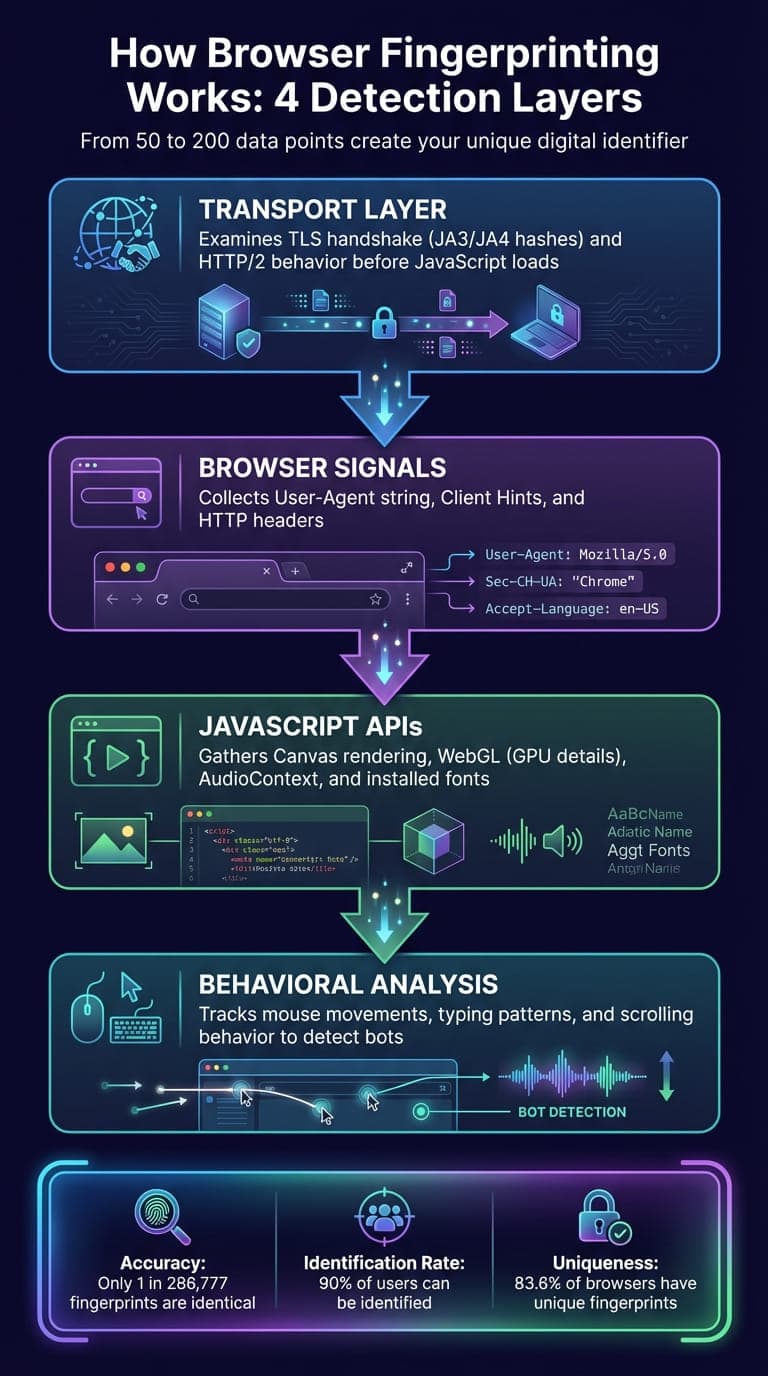
4-Layer Browser Fingerprinting Detection Process
What Browser Fingerprinting Is
Browser fingerprinting involves collecting a wide range of data points - anywhere from 50 to 200 - from your device, browser, and network. This data creates a unique digital identifier that websites can use to track you. Unlike cookies, which are stored on your device, fingerprints are calculated on the server side and remain invisible to users. The process unfolds across four main layers:
- Transport Layer: This layer examines your TLS handshake (using JA3/JA4 hashes) and HTTP/2 behavior before any JavaScript even loads.
- Browser Signals: Here, data is gathered from elements like your User-Agent string, Client Hints, and HTTP headers.
- JavaScript APIs: This layer digs deeper, using tools like Canvas rendering, WebGL (which exposes GPU details), AudioContext, and even checking your installed fonts.
- Behavioral Analysis: This step observes how you interact with your device - tracking things like mouse movements, typing patterns, and scrolling behavior - to differentiate between human users and bots.
"A fingerprint is just a unique (or almost-unique) combination of attributes that can be tied back to a user's device, browser, or connection."
– Alejandro Loyola, Technical Support at Browserless
Websites use scripts to gather this data, hash it into a compact identifier, and store it server-side. This process is remarkably accurate - studies show that only about 1 in 286,777 browser fingerprints are identical. By combining data like graphics, fonts, and audio signals, platforms can identify approximately 90% of users.
These layers illustrate how detailed and precise digital fingerprints can be, laying the groundwork for understanding their role in account bans.
Why Fingerprints Lead to Account Bans
Once a fingerprint is created, platforms use it to enforce account bans. The same digital signature across multiple accounts is a red flag for detection systems. Even if the credentials differ, the shared fingerprint links the accounts together.
Platforms run consistency checks to ensure that all layers of the fingerprint align. For example, if a Windows User-Agent is paired with macOS-specific fonts, it raises suspicion. Similarly, mismatches between your proxy IP (e.g., showing New York) and your browser’s timezone (e.g., set to London) are often flagged as fraudulent activity. These inconsistencies not only suggest automation but also compromise the credibility of any associated accounts.
Modern detection systems focus heavily on transport-layer signals. Even if you modify JavaScript-level data, inconsistencies in your JA3 hashes or connection signature can expose the alteration. This makes it almost impossible to bypass detection by simply tweaking surface-level signals.
Another issue arises with randomized fingerprints. Real users typically have stable device signatures - your GPU, fonts, and other hardware details don’t change often. But frequent changes to an account's fingerprint, such as switching Canvas or WebGL data, create anomalies that anti-fraud systems flag. For instance, a 2025 field test found that Canvas, WebGL, and font data remained 85% stable over two weeks, even when cookies were cleared, and IPs were changed.
This combination of precision and stability in fingerprinting explains why platforms rely on it to detect and act against suspicious activity.
Common Mistakes That Don't Work
Relying on quick fixes to avoid fingerprint detection often leads to more harm than good. Understanding why these methods fail can save you from wasted effort and potential account bans.
Why Incognito Mode and VPNs Aren't Enough
Using incognito mode might clear cookies and browsing history from your device, but it doesn’t touch the deeper technical signals websites collect. Things like your GPU rendering, installed fonts, screen resolution, and audio processing capabilities remain fully visible to detection systems.
VPNs, on the other hand, mask your IP address but leave over 50 fingerprint parameters exposed. This mismatch between a "new" IP and a "known" device fingerprint immediately raises suspicion. For example, in December 2025, an arbitrageur using multiple proxies experienced the simultaneous banning of 15 Facebook Ads accounts. The culprit? Matching Canvas and WebGL fingerprints. This slip-up cost them $3,500 in lost ad spend.
The stats are clear: 83.6% of browsers have unique fingerprints, and 99.24% of users can be identified when browser and device fingerprints are combined. A VPN might hide your location, but it can’t disguise your hardware. Platforms also use TLS fingerprinting to identify browsers during the initial connection - before any page loads or privacy tools kick in.
"Using a VPN is like wearing a mask but keeping your unique uniform, voice, and gait. Anyone who knows you will still recognize you instantly."
– Joanna Ok., Content Writer, Multilogin
Other popular tools also fall short when it comes to fully masking your digital identity.
Problems with Browser Extensions and Script Blockers
Browser extensions designed to block fingerprinting often make your situation worse. For instance, less than 0.2% of internet users disable JavaScript. Doing so makes your browser stand out as unusual, raising a red flag for detection systems. Similarly, User-Agent switchers can create mismatched "Frankenstein" fingerprints - for example, claiming to be an iPhone while reporting a desktop screen resolution and Windows-specific fonts.
Extensions also fail to address deeper transport-layer signals like TLS handshakes, which occur before JavaScript even runs. These low-level protocol signatures allow platforms to identify your browser binary before any privacy tools take effect. Tools that randomize your fingerprint every session are equally ineffective because most users have stable device configurations. This inconsistency only makes you appear more suspicious.
Even the presence of privacy-focused extensions can be detected through resource timing attacks, adding another layer to your fingerprint instead of concealing it. As Joanna Ok. points out:
"The more you try to actively fight your fingerprint, the more unique and suspicious you become."
– Joanna Ok., Content Writer, Multilogin
Method | What It Does | Why It Fails |
|---|---|---|
VPN | Hides IP address | Leaves 50+ other fingerprint parameters exposed; creates mismatches |
Incognito Mode | Clears local cookies | Fingerprint is generated and stored server-side |
JavaScript Blockers | Blocks tracking scripts | Generates an unusual fingerprint and may break site functionality |
User-Agent Switchers | Alters browser identity | Creates mismatched hardware/software data, raising suspicion |
These examples show that avoiding detection requires more advanced anti-detection technology than the common tools most people rely on.
How to Avoid Fingerprint-Based Bans: Step-by-Step
Now that you know why common methods often fall short, let’s dive into what actually works to safeguard your accounts from fingerprint detection.
Step 1: Use an Anti-Detection Browser Like GoUndetected
The first step to protecting your digital identity is using a browser designed to generate a unique fingerprint for each account. Instead of trying to block fingerprinting - an approach that's easily flagged - GoUndetected creates realistic and complete fingerprints. It adjusts key parameters like User-Agent, screen resolution, fonts, Canvas, and WebGL signatures, while also mimicking hardware features such as graphics cards and audio processing.
This setup ensures every profile operates with isolated cookies, cache, and local storage. Consistency is critical - sudden changes in fingerprints can raise suspicion. GoUndetected ensures stability across sessions, even handling details like SSL/TLS fingerprints during encrypted handshakes. It also syncs your profile’s timezone, language, and WebRTC settings with your proxy’s IP location, avoiding mismatches like pairing a New York IP with a London timezone - something platforms might flag.
Step 2: Connect Residential Proxies
Once your fingerprint is stable, the next step is using an IP address that matches your setup. Residential proxies are ideal since they use real IP addresses from ISPs, making your activity appear like that of a typical home user. In GoUndetected, you can add your proxy credentials (protocol, IP, port, and authentication) in the profile settings. Use the "Fill based on IP" option to automatically sync geolocation settings.
Before logging in, it’s important to double-check for any leaks. Tools like Pixelscan or ipleak.net can help ensure there are no WebRTC or DNS leaks exposing your real IP address.
Step 3: Build Natural Account Activity
Technical tools alone won’t cut it - your behavior also needs to look authentic. Anti-fraud systems are increasingly sophisticated, monitoring behavioral patterns like mouse movements, keyboard use, scrolling, and click timing to separate real users from bots.
Start by creating a browsing history. Spend time visiting related websites, exploring pages, and letting the profile accumulate cookies and session data over a few days before jumping into any high-stakes actions. When you do start using the account, mimic natural interaction by varying your mouse movements, scrolling patterns, and pauses. Avoid jumping directly to deep pages using URLs - navigate through the site like a real user would.
Another key tip: avoid operating on a rigid schedule. Bots often perform tasks at predictable intervals, which can be a red flag. As Iremar Brayner, Senior Fraud Manager at Farfetch, points out:
"Today, I think it's more about the behavior itself than a specific data point." – Iremar Brayner, Senior Fraud Manager, Farfetch
Managing Large Numbers of Accounts
Using Unlimited Profiles and Bulk Tools
Once your accounts are secure and fingerprint-based bans are under control, the next challenge is scaling efficiently. Managing dozens - or even hundreds - of accounts manually is just not realistic. That’s where GoUndetected’s bulk tools come in. They let you perform one-click actions to create, rename, delete, or edit hundreds of profiles all at once. This saves you from repetitive tasks while keeping security intact and avoiding detection. It’s a game-changer for running large campaigns or updating proxy settings across multiple accounts.
For teams focused on automation, GoUndetected’s RESTful API is designed to handle up to 1,200 requests per minute. It works seamlessly with frameworks like Selenium, Puppeteer, and Playwright, allowing you to automate tasks like profile creation, launching browser sessions, and managing cookies - no manual work required. The platform is built for reliability, with a 99.99% historical uptime powered by AWS and Google Cloud’s load balancing. Plus, its 100 ms response time ensures the interface stays quick and responsive, even when juggling hundreds of profiles.
Working with Teams and Sharing Profiles
After setting up secure individual profiles, the next step is ensuring smooth teamwork. GoUndetected’s cloud-synced profiles make collaboration easy by allowing team members to access identical browser environments from any device - no need for manual data transfers. To avoid mishaps, the platform automatically locks a session when one team member is using a profile, preventing others from accessing it at the same time. This avoids the risk of simultaneous logins from different IP addresses, which could trigger security concerns.
Organizing accounts is simple with Smart Folders, which let you group profiles by client, project, or platform. For example, you could have folders like "Facebook Ads – Client A" or "Instagram – Client B" and assign access permissions accordingly. Role-based access ensures everyone has the right level of control, with three roles available: Admin (full access), Manager (can create and edit profiles), and Operator (can only use profiles). To keep everything transparent, activity logs track who accessed each profile and when, so accountability is always clear.
Conclusion
Avoiding fingerprint-based account bans requires a combination of three key factors: unique browser fingerprints for each profile, high-quality proxies to separate IP identities, and consistent, natural account behavior that aligns with platform rules. These elements are interconnected - relying on a proxy alone leaves your hardware vulnerable, and even the most advanced fingerprint spoofing will fail without realistic account activity. Together, they create a comprehensive defense system.
GoUndetected offers realistic, stable fingerprints that closely imitate genuine users, reducing the chances of triggering platform alarms. Pairing this with residential proxies - which typically range from $50 to $500 per month depending on usage - helps establish isolated digital identities that are difficult for platforms to link. However, technology alone isn’t enough. To avoid detection, you must also emulate natural human behavior: vary your login times, gradually build browsing histories, and steer clear of repetitive actions.
As detection systems grow more advanced, the importance of organic behavior only increases. Platforms now employ machine learning to uncover connections between accounts, analyzing everything from mouse movements to typing speeds. To counteract this, your setup must be equally sophisticated. For example, ensure your timezone matches your proxy location, align your User-Agent with your hardware, and maintain consistent, believable activity patterns.
A professional setup that includes an anti-detection browser like GoUndetected and residential proxies typically costs between $150 and $800 per month. While this may seem like a significant investment, it provides essential protection for your accounts and supports scalable operations.
FAQs
How can I check what fingerprint signals a site sees from my browser?
To find out what fingerprint signals your browser is revealing, you can use tools like fingerprint testing websites or anti-detect browsers. Fingerprint testing platforms examine details like your hardware, software, and network configurations. On the other hand, anti-detect browsers often come with built-in fingerprint analysis features. Both options allow you to identify the signals your browser is exposing and make adjustments to minimize tracking.
What makes a proxy–timezone–language mismatch look suspicious to platforms?
A mismatch between a proxy, timezone, and language settings can immediately trigger suspicion. Why? It points to behavior that doesn't quite add up. For instance, if an IP address shows one location but the browser settings suggest another, it might signal automated scripts or efforts to evade detection systems. Many platforms flag these inconsistencies as unusual and often link them to potentially fraudulent or questionable activities.
How long should I 'warm up' a new profile before logging into an account?
When setting up a new profile, it's a good idea to "warm it up" over a few days by gradually increasing activity. This means mimicking natural behavior, such as casually browsing websites, before attempting higher-risk actions like logging into sensitive accounts. Jumping straight into these actions without preparation can lead to stricter anti-bot checks. Taking the time to warm up helps build trust and reduces the chances of detection.
Browse Undetected. Stay Private.
Unique browser fingerprints, built-in proxy support, and anti-detection technology. Try GoUndetected free for 7 days.
Available for macOS and Windows · No credit card required