
How to Use Residential Proxies for Multi-Account Management
Assign unique residential IPs and use anti-detection browsers to isolate profiles, sync geolocation, and reduce bans when managing multiple accounts.

How to Use Residential Proxies for Multi-Account Management
Managing multiple accounts on platforms like Facebook or Amazon is risky without the right tools. Residential proxies provide a solution by assigning unique, trusted IPs to each account, ensuring they appear independent and reducing the chances of bans. Paired with tools like GoUndetected, which uses an undetected browser to mask fingerprints and syncs settings with proxy locations, you can securely manage multiple profiles without detection.
Key Takeaways:
- Residential Proxies: Route traffic through real devices with ISP-assigned IPs, making your activity appear legitimate.
- GoUndetected: A tool that isolates browser profiles, randomizes fingerprints, and integrates proxies for secure multi-account management.
- Best Practices:
- Assign one proxy per account.
- Use sticky sessions for stable IPs up to 24 hours.
- Regularly test proxies to ensure they’re clean and functional.
By combining residential proxies with anti-detection browsers, you can effectively manage multiple accounts while maintaining security and avoiding platform bans.
Proxy Tips for Affiliates: Manage Multiple Accounts Like a Pro! - Stan Sadokov
Selecting Tools for Multi-Account Management
Managing multiple accounts effectively requires a combination of reliable residential proxies and a robust anti-detection browser. Using one without the other increases your risk of detection. Once you’ve identified the tools you need, it’s time to carefully evaluate your options before integrating them.
How to Choose a Residential Proxy Provider
When selecting a residential proxy provider, there are a few key factors to consider:
- IP pool size: A larger pool - ranging from 30 to 175 million IPs - reduces the likelihood of reusing flagged addresses, giving you access to cleaner, more reliable IPs for your accounts.
- Geographic coverage: If your accounts need to appear in specific regions, choose a provider that offers access to over 150 countries. Granular targeting, such as city, ZIP code, or ISP-level precision, ensures your accounts meet regional verification requirements.
- Ethical sourcing: Stability and compliance matter. Look for providers using opt-in P2P networks or direct ISP partnerships, as these connections are more reliable. Premium proxies can even achieve success rates of up to 99.9% on high-security platforms like Amazon.
- Pricing: Costs vary widely. Traffic-based plans range from $1.00/GB for budget options to $15.00/GB for enterprise-grade services. Static IPs typically start around $5.00 per IP for a 30-day period. If your account management needs are sporadic, consider non-expiring traffic plans instead of monthly bandwidth limits.
- Testing capabilities: Before committing, use tools like ipinfo.io to verify the proxy’s location accuracy and ensure it’s not blacklisted. Check that headers align with the proxy's geolocation to avoid triggering regional flags.
Using GoUndetected for Multi-Account Management
Once you’ve chosen a high-quality proxy provider, integrating it with GoUndetected can significantly strengthen your defenses against detection. GoUndetected combines advanced fingerprint masking and proxy support to create isolated, undetectable account profiles.
The platform assigns a unique proxy to each profile and synchronizes timezone, language, and geolocation settings with the proxy’s IP. This ensures consistent fingerprints and avoids mismatches that could link your accounts. By randomizing over 50 parameters - like Canvas, WebGL, Audio, and WebRTC - GoUndetected ensures every profile appears as a distinct device.
Key features of GoUndetected include:
- Proxy compatibility: It supports HTTP, HTTPS, SOCKS4, and SOCKS5 proxies, allowing seamless integration with any residential proxy provider. Additionally, it offers built-in residential and mobile proxies across 100+ countries, eliminating the need for third-party setups.
- Session persistence: Cookies, cache, and local storage remain separate for each profile, enabling you to log into multiple accounts simultaneously without cross-contamination.
- Reliability and security: With 99.99% uptime supported by AWS and Google Cloud load balancing, the platform ensures uninterrupted connectivity. Auto-failover mechanisms handle proxy node failures, while AES-256 encryption safeguards all profile data and activities.
- Team-friendly features: Role-based permissions allow teams to share accounts securely without exposing sensitive information like passwords.
How to Set Up Residential Proxies in GoUndetected
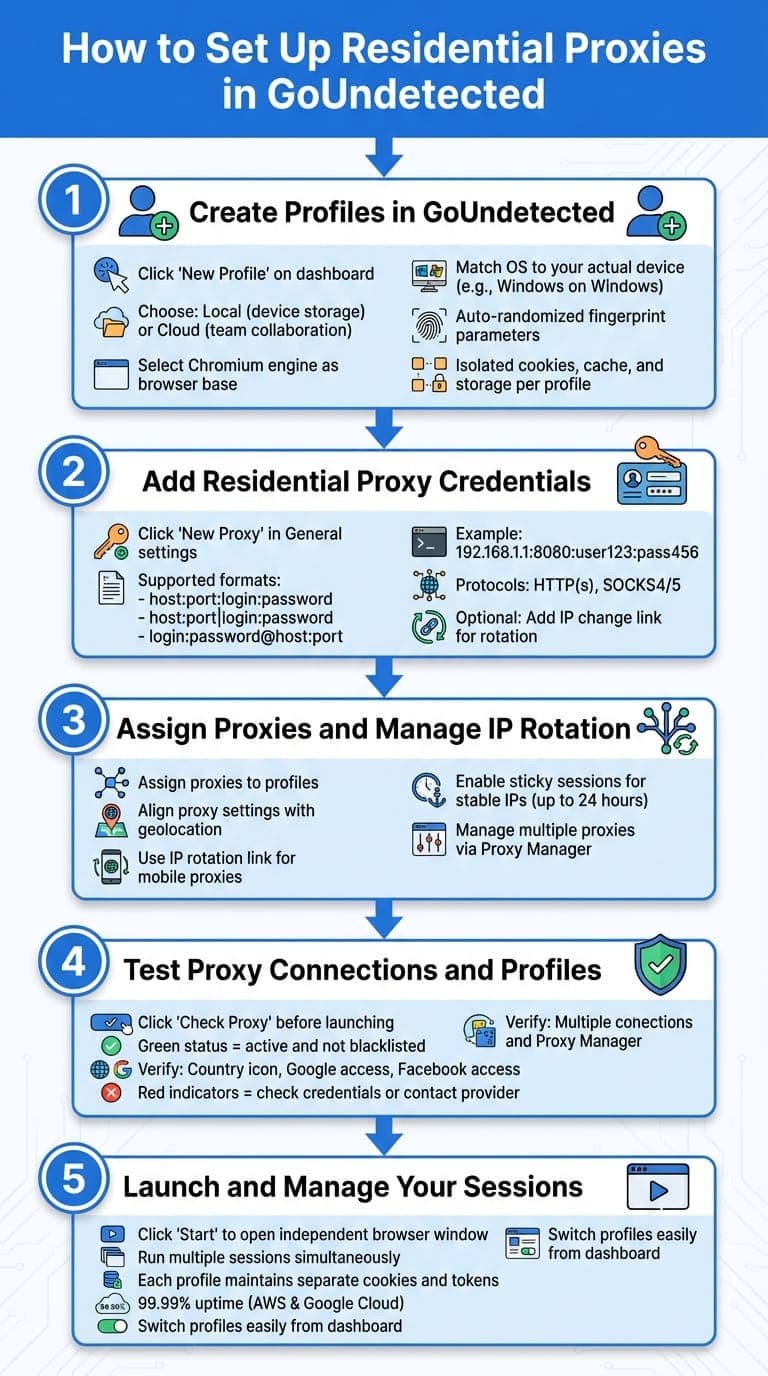
5-Step Guide to Setting Up Residential Proxies in GoUndetected
Setting up residential proxies with GoUndetected is straightforward. Here’s a step-by-step guide to get you started.
Step 1: Create Profiles in GoUndetected
Start by clicking "New Profile" on the dashboard. This opens the configuration window where you can choose between Local profiles (stored on your device) or Cloud profiles (stored on GoUndetected's servers for team collaboration). For the best experience, select the Chromium engine as the browser base.
When setting up your profile, ensure the operating system matches your actual device - for example, pick a Windows configuration if you're using a Windows computer. This prevents fingerprint mismatches. GoUndetected automatically randomizes fingerprint parameters for added security. Each profile is isolated, with its own cookies, cache, and local storage.
Step 2: Add Residential Proxy Credentials
In the General settings of your profile, click "New Proxy" to manually enter your proxy credentials. Supported formats include:
- host:port:login:password
- host:port|login:password
- login:password@host:port
For instance: 192.168.1.1:8080:user123:pass456. Both HTTP(s) and SOCKS4/5 protocols are supported, along with authentication. If you’re using mobile or rotating residential proxies, you can input the IP change link in the rotation field to control IP switches directly from the app.
Step 3: Assign Proxies and Manage IP Rotation
Once your proxy credentials are added, assign them to your profiles. Align the proxy settings with the geolocation of each proxy for seamless operation.
For mobile proxies, use the IP rotation link to switch IPs as needed. If you prefer stable connections, select sticky sessions to maintain the same IP for up to 24 hours. You can also manage multiple proxies at once through the Proxy Manager, simplifying bulk operations.
Step 4: Test Proxy Connections and Profiles
Before launching a session, click "Check Proxy" to verify your connection. A successful test will display a country icon and green status indicators for platforms like Google and Facebook, confirming the proxy is active and not blacklisted. This process checks your IP address, location, and access to secure platforms. If you encounter red indicators or error messages, double-check your credentials or consult your proxy provider.
Step 5: Launch and Manage Your Sessions
Select a profile and click "Start" to open an independent browser window with its own fingerprint and network context. This setup lets you run multiple sessions simultaneously without interference between accounts.
Switching between profiles is easy - return to the dashboard and launch other sessions as needed. Each profile maintains its own cookies, cache, and authentication tokens, allowing you to stay logged into multiple accounts on the same platform. With 99.99% uptime supported by AWS and Google Cloud load balancing, your sessions remain stable, even during extended use.
Best Practices for Multi-Account Management
Managing multiple accounts goes beyond just setting up proxies and creating profiles. The way you handle these accounts plays a huge role in keeping them active and avoiding flags. Using GoUndetected’s advanced tools alongside these tips can make multi-account management much smoother.
Keep Each Account Profile Separate
Account isolation is key to maintaining security. With GoUndetected, every profile operates independently. This means each has its own digital fingerprint, cookies, cache, and login sessions. Why does this matter? It minimizes the chances of platforms linking your accounts. As GoUndetected puts it, "Each profile is completely isolated. Cookies, storage, and fingerprints never leak between profiles". This level of separation is essential, especially when juggling multiple accounts at once.
Check Proxy Performance Regularly
Once your profiles are set up, don’t overlook proxy performance. Regular checks help ensure your accounts stay secure. Before starting any session, make use of the "Check Proxy" feature to confirm the connection is solid and that the IP isn’t blacklisted. For more in-depth checks, services like ipinfo.io or whoer.net can reveal whether an IP has been flagged on specific platforms.
Keep an eye out for warning signs like slow connection speeds, frequent timeouts, or sudden IP changes. If issues pop up, address them quickly to maintain smooth performance and stay under the radar.
Enable Encrypted Sessions for Security
Encryption is a must for safeguarding your accounts against interception. GoUndetected employs AES-256 encryption to secure all profile data and browsing activity. According to the platform, "Your data and accounts are secured with AES-256 encryption, firewalls, and hosting on secure servers". Additionally, GoUndetected offers encrypted cloud storage, which allows you to share profiles with teammates without exposing passwords. These measures add an extra layer of security, ensuring your accounts remain protected during every session.
Conclusion
Managing multiple accounts securely requires careful planning and the right tools. Combining residential proxies with GoUndetected creates a powerful setup to protect both your device and network fingerprints. While GoUndetected randomizes over 50 browser parameters to mask your identity, residential proxies route your traffic through ISP-assigned IPs, adding another layer of anonymity. This combination ensures your accounts remain unlinked and your online activities stay private.
GoUndetected also offers an automated geo-alignment feature that syncs your browser's timezone, language, and WebRTC geolocation with your proxy's location. This eliminates regional mismatches that could raise red flags on platforms. Features like role-based access and secure profile sharing make team collaboration seamless, without compromising sensitive information like passwords. Plus, with a 99.99% uptime record powered by AWS and Google Cloud, the platform reliably supports agencies managing hundreds of accounts.
These tools and features emphasize the importance of disciplined practices to ensure long-term success in multi-account management.
Tips for Long-Term Multi-Account Success
To maximize these benefits, consider adopting the following practices:
- Maintain a 1:1 ratio between browser profiles and residential proxies. Assigning one unique proxy per profile minimizes the risk of account linking by keeping IP addresses distinct.
- Regularly verify geolocation using tools like ipinfo.io or whoer.net. This ensures your proxy's location aligns with your browser settings, reducing the chances of detection.
- Enable Two-Factor Authentication (2FA) on your GoUndetected account and ensure AES-256 encryption for added security.
- Monitor proxy performance consistently. Address slow speeds, timeouts, or unexpected IP changes promptly to avoid disruptions.
FAQs
How many accounts can I safely run at once?
The number of accounts you can safely manage depends on the platform's detection systems and the quality of your proxy setup. Residential proxies paired with an anti-detection browser, such as GoUndetected, can help you handle multiple accounts more securely. However, the exact limit varies depending on the platform's rules and how reliable your proxies are. To reduce the risk of detection, always stick to the platform's guidelines.
When should I use sticky sessions vs rotating IPs?
When continuity is key - like during login processes, multi-step forms, or transactions that rely on persistent cookies or tokens - sticky sessions are the way to go. They ensure the same IP address is maintained throughout the session, which minimizes detection risks and keeps everything running smoothly.
On the other hand, rotating IPs are ideal for activities such as large-scale web scraping or distributed testing. Frequent IP changes boost anonymity and make it harder for platforms to detect patterns or connect accounts.
What settings should match my proxy location to avoid flags?
To keep your activity under the radar, make sure your proxy location aligns with your target location. This alignment makes your traffic seem more natural and localized to the platform, lowering the chances of being flagged.
Browse Undetected. Stay Private.
Unique browser fingerprints, built-in proxy support, and anti-detection technology. Try GoUndetected free for 7 days.
Available for macOS and Windows · No credit card required