
Proxy Tips for LinkedIn Outreach in Freelancing
Use residential or mobile proxies with anti-detect browsers to scale LinkedIn outreach safely, isolate accounts, and reduce ban risk.

Proxy Tips for LinkedIn Outreach in Freelancing
LinkedIn is the go-to platform for freelancers to connect with clients and grow their network. But with strict policies and detection systems, scaling outreach can be tricky. Proxies are essential for managing multiple accounts safely, avoiding bans, and staying under LinkedIn's radar. Here’s how to use them effectively:
- Why Proxies Matter: LinkedIn tracks IPs, device fingerprints, and behavior. Proxies mask your IP and assign unique addresses to accounts, preventing detection.
- Best Proxy Types: Mobile proxies (4G/5G) offer the highest safety (85–95% success rate), followed by residential proxies (95–99%). Avoid datacenter proxies - they’re easily flagged.
- Avoiding Detection: Use tools like GoUndetected to match IP location with your profile’s timezone and browser settings. Stick to LinkedIn’s activity limits: ~15–25 connection requests per day.
- Account Isolation: Follow the 1:1:1 rule - one proxy, one browser profile, one LinkedIn account. Never share proxies across accounts.
How to Automate LinkedIn Outreach Safely with LinkedHelper: Campaigns, Proxies, and Workflows
Why Freelancers Need Proxies for LinkedIn Outreach
Managing LinkedIn outreach without proxies can expose you to serious risks, including coordinated bans. LinkedIn uses a sophisticated IP reputation tracking system. If you're handling multiple client accounts or running campaigns from a single IP address, the platform might flag this as inauthentic behavior. This could lead to a domino effect, where all linked accounts are banned. To avoid this, it's essential to understand how LinkedIn's detection systems work.
"Losing or temporarily blocking a LinkedIn account, especially a client's, means losing the account as an asset. This results in shadow banning, reduced post reach, lost leads, and damage to the agency's reputation."
- Peter, Outreach Expert, GetSales
Avoiding IP Bans and Detection
LinkedIn's detection system doesn't just rely on tracking IP addresses. Its Sentinel AI examines your digital fingerprints. If these fingerprints don’t match, accounts can be flagged. LinkedIn also assigns IP reputation scores, factoring in historical activity and ASN classification. For example, datacenter IPs are often blocked because they don't align with typical user behavior - most professionals don’t access LinkedIn from server racks. Additionally, "impossible travel" detection, such as logging in from vastly different locations within a short time, can trigger immediate security blocks.
Proxies solve these issues by masking your real IP address and assigning unique geographic locations to each account. Among proxy types, mobile proxies are the most reliable. They use CGNAT (Carrier-Grade NAT), where thousands of real users share the same IP, making it harder for LinkedIn to block traffic without affecting legitimate users. Mobile proxies boast an 85% account survival rate, compared to around 50% for residential proxies and near-instant bans for datacenter IPs. Knowing how these tools work is essential for scaling outreach safely.
Scaling Outreach Without Compromising Security
Proxies play a pivotal role in creating a secure and scalable LinkedIn outreach strategy. By masking your IP and isolating activities, proxies let you manage multiple accounts without hitting LinkedIn’s weekly limit of approximately 100 connection requests per profile. Instead of maxing out a single account, you can distribute your efforts across several profiles, each with its own IP address and identity.
However, safe scaling requires more than just proxies. You’ll also need antidetect browsers to keep cookies, local storage, and browser fingerprints separate for each account. Without these tools, LinkedIn can connect your profiles through device fingerprinting, analyzing details like your operating system, browser setup, screen resolution, installed fonts, and timezone.
For freelancers managing client accounts, the stakes are high. A permanent LinkedIn ban doesn’t just disconnect you from leads - it also wipes out endorsements, recommendations, and content history. Considering that 89% of B2B marketers rely on LinkedIn for lead generation, losing access to the platform could severely impact your ability to deliver results and maintain client relationships.
Choosing the Right Proxies for LinkedIn Campaigns
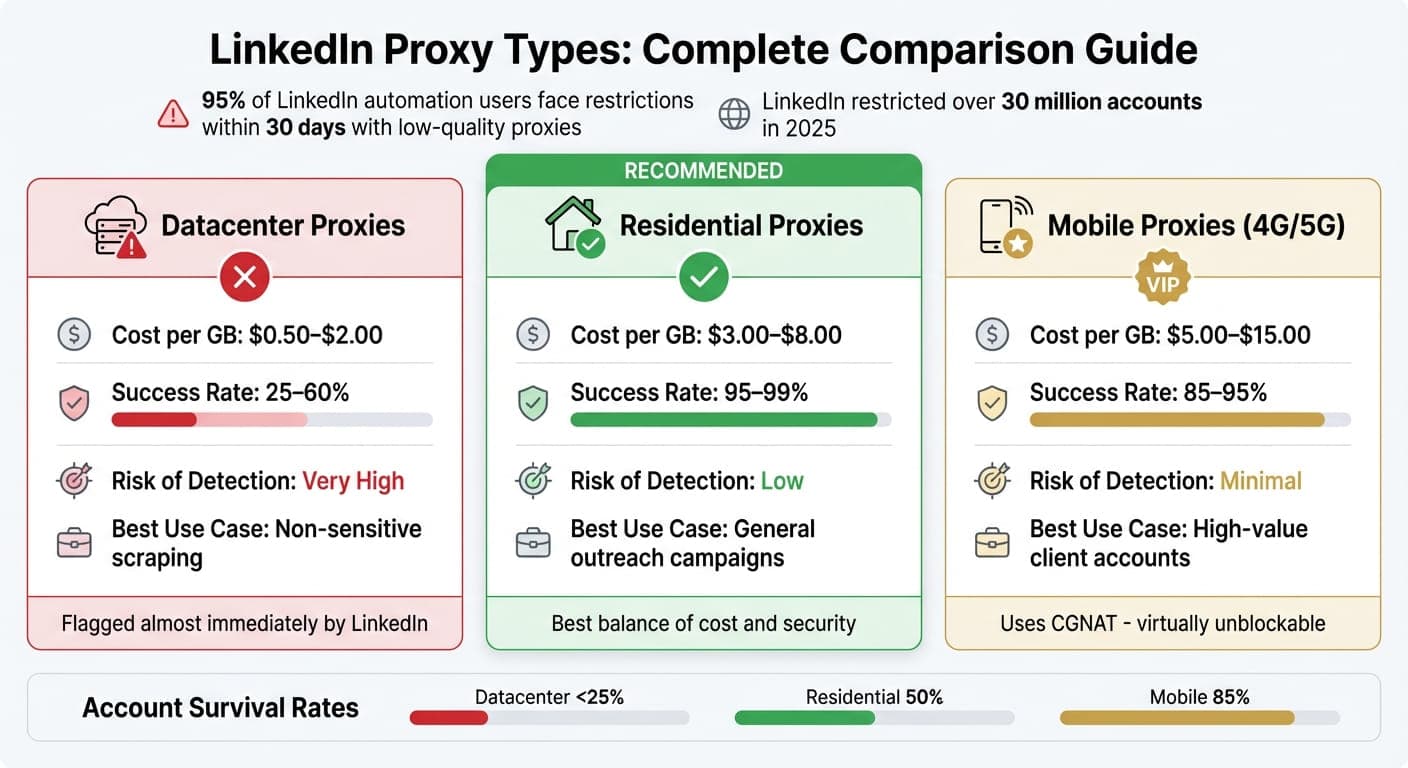
LinkedIn Proxy Types Comparison: Cost, Success Rates, and Best Use Cases
Proxies play a critical role in LinkedIn automation, and selecting the wrong kind can jeopardize client accounts. With LinkedIn's strict monitoring, it's no surprise that 95% of LinkedIn automation users face restrictions within the first 30 days when using low-quality proxies. The choice you make can mean the difference between a thriving outreach campaign and a banned account.
Residential vs. Datacenter Proxies
Understanding the differences between proxy types is crucial to staying compliant with LinkedIn’s security measures.
Datacenter proxies are provided by cloud platforms like AWS or Google Cloud instead of residential internet providers. While these proxies are fast and inexpensive (ranging from $0.50 to $2.00 per GB), they are flagged almost immediately by LinkedIn. This is because LinkedIn performs routine ASN (Autonomous System Number) checks, and if the proxy is tied to a hosting provider, your access could be blocked before you even log in.
Residential proxies, on the other hand, use IP addresses assigned by ISPs to real households. These proxies are seen as legitimate user traffic, giving them a much higher trust score and making them difficult for LinkedIn to detect. Although they are pricier - typically $3.00 to $8.00 per GB - their success rates (95–99%) make them a worthwhile investment, especially for outreach campaigns.
Mobile proxies (4G/5G) take security to the next level, costing $5.00 to $15.00 per GB. They rely on Carrier-Grade NAT (CGNAT), where thousands of users share the same IP address. This setup makes it virtually impossible for LinkedIn to block the IP without affecting real users. These proxies are ideal for protecting high-value client accounts where the stakes are higher.
Proxy Type | Cost per GB | Success Rate | Risk of Detection | Best Use Case |
|---|---|---|---|---|
Datacenter | $0.50–$2.00 | 25–60% | Very High | Non-sensitive scraping |
Residential | $3.00–$8.00 | 95–99% | Low | General outreach campaigns |
Mobile (4G/5G) | $5.00–$15.00 | 85–95% | Minimal | High-value client accounts |
For freelancers managing LinkedIn campaigns, residential proxies strike the right balance between cost and security. However, for accounts where bans would be catastrophic, mobile proxies are the safest option.
Key Features to Look for in Proxy Providers
Choosing the right proxy type is only part of the equation. The features offered by your proxy provider can make or break your LinkedIn campaigns. Here are some essentials to look for:
- Dedicated Proxies for Each Account: Never share a proxy across multiple accounts. Doing so can lead to cascading bans, where LinkedIn links and suspends all associated accounts.
- Sticky Sessions: These allow the same IP to be used consistently for 30 minutes to 24 hours, mimicking normal user behavior. This reduces the likelihood of LinkedIn flagging suspicious activity.
- Geo-targeting: Ensure the proxy’s location aligns with the LinkedIn profile’s stated location and the browser’s timezone. Mismatches can trigger LinkedIn’s identity checks and raise red flags.
- SOCKS5 Protocol Support: Unlike HTTP/HTTPS, SOCKS5 provides stronger encryption and better stability, which is particularly useful for long-term automation tasks.
- Integration with Anti-detect Browsers: Providers that sync with tools like GoUndetected can automatically align the proxy’s metadata with browser fingerprints, making your automation efforts seamless.
- IP Quality Checks: Look for proxies with fraud scores below 30 and no history on blacklists like Spamhaus or Barracuda. Avoid proxies from regions with high fraud associations, such as Russia (30% success rate), China (25%), or India (35%). Also, ensure the provider offers diverse ASNs to avoid LinkedIn linking multiple accounts to the same network.
Integrating Proxies with GoUndetected for Secure LinkedIn Profiles
After choosing the right proxies, the next step is ensuring they integrate seamlessly while avoiding any digital footprints. LinkedIn’s Sentinel AI doesn’t just track IP addresses - it scrutinizes over 50 browser parameters, such as Canvas rendering, WebGL signatures, and audio context patterns.
GoUndetected simplifies this process by syncing proxy metadata with your browser fingerprint automatically. For example, if you assign a residential proxy from New York to a LinkedIn profile, the platform adjusts the timezone to Eastern Standard Time, sets the language to en-US, and matches the geolocation accordingly. This automation eliminates manual errors, which often lead to restrictions - statistics show that over 45% of LinkedIn outreach accounts face limitations within the first two weeks.
The platform also randomizes key browser parameters, including Canvas, WebGL, Audio Context, and hardware concurrency, ensuring that every profile looks like it’s being accessed from a unique physical device. Unlike standard Chrome profiles, which share a common hardware fingerprint, GoUndetected creates isolated environments for each profile. This means each profile has its own cookies, local storage, and cache, reducing the risk of chain bans, where multiple accounts are suspended simultaneously.
For freelancers or agencies managing multiple client accounts, the Team Sharing feature is a game-changer. It allows team members to access LinkedIn profiles without revealing passwords. Additionally, Session Locking prevents simultaneous logins, which could trigger LinkedIn’s security systems and raise red flags.
– Verified User, Agency Owner
Here’s how to configure proxy support in GoUndetected.
Setting Up Proxy Support in GoUndetected
Getting proxies up and running in GoUndetected is simple but requires attention to detail. Start by creating a new browser profile to generate a distinct and realistic fingerprint. The platform supports multiple protocols, including HTTP, HTTPS, SOCKS4, and SOCKS5, with authentication, making it compatible with various proxy providers.
Assigning a proxy automatically adjusts timezone, language, and geolocation to match the IP, reducing the chance of errors. To avoid detection, match the emulated operating system with your actual hardware. Be sure to configure realistic CPU cores and RAM - 4 to 8 cores and 8 GB to 16 GB of RAM are good benchmarks. Mismatched system fonts between the emulated OS and your actual hardware can also set off alarms.
Before logging into LinkedIn, take time to prepare your profiles. Use the Cookie Robot to visit 10 to 15 high-authority websites and let the profile sit for 24 hours. This builds a browsing history that makes the profile appear more legitimate.
When configuring WebRTC, choose "Replace" or "Fake" instead of "Disable." Disabling WebRTC is a known indicator of proxy use, while replacing it allows your residential proxy IP to appear authentic. GoUndetected also includes an auto-failover feature to keep profiles connected even if a proxy node goes down.
Once your proxies are configured, focus on isolating accounts for maximum security.
Managing Multiple Accounts Safely with GoUndetected
To ensure each LinkedIn account remains secure and independent, GoUndetected offers tools like Team Sharing and Session Locking. These features help maintain account isolation and prevent cross-contamination.
With Team Sharing, administrators can create profiles and assign access to team members without exposing sensitive login details. Session Locking further enhances security by tracking profile usage in real time, preventing simultaneous logins that could alert LinkedIn’s security systems.
GoUndetected encrypts all profile data using AES-256 and follows a strict zero-knowledge policy, ensuring no user activity is recorded. The platform also provides access to residential and mobile proxies from over 100 countries, removing the need for separate proxy subscriptions. With a proven uptime of 99.99% - thanks to AWS and Google Cloud-based load balancing - and a support team that guarantees a 3-minute response time 24/7/365, reliability is a key strength.
For users managing automation-heavy workflows, GoUndetected offers a high-performance RESTful API. It supports up to 1,200 requests per minute and integrates seamlessly with tools like Selenium, Puppeteer, and Playwright. This makes it possible to scale LinkedIn outreach campaigns while maintaining airtight security and isolated fingerprints for all profiles.
Step-by-Step Proxy Configuration for LinkedIn Outreach
To ensure your LinkedIn outreach runs smoothly and avoids detection, it’s crucial to configure proxies correctly. This guide walks you through the process, step by step, so your accounts remain secure and independent.
Step 1: Create Separate Profiles in GoUndetected
Start by creating a separate browser profile in GoUndetected. This tool generates unique fingerprints (like Canvas, WebGL, and audio) for each LinkedIn account, which helps avoid detection.
Match the emulated operating system to your actual hardware to prevent mismatches. For example, configure realistic hardware values like 4–8 CPU cores and 8–16 GB of RAM to make the profile look authentic.
Adjust WebRTC settings to "Replace" or "Fake" and randomize media devices to simulate real hardware. Before logging into LinkedIn, use the Cookie Robot to visit 10–15 high-authority websites (think Amazon or The New York Times). Let the profile sit for 24 hours to build a browsing history that appears legitimate.
Once your profiles are ready, you can move on to assigning proxies.
Step 2: Assign Proxies to Each Profile
Assign a unique proxy (HTTP, HTTPS, or SOCKS4/5 with authentication) to each browser profile. You can use either third-party proxies or GoUndetected's built-in residential and mobile proxy options.
GoUndetected will automatically sync timezone, language, and geolocation with the assigned IP address. Make sure the User-Agent matches one of the last two Chrome updates - using an outdated browser version can raise red flags with LinkedIn.
Step 3: Test IP Rotation and Fingerprint Spoofing
Before starting your outreach, test your setup thoroughly. Use tools like BrowserLeaks or ipleak.net to confirm the proxy’s location and check for any WebRTC or DNS leaks.
Verify the Autonomous System Number (ASN) to ensure the IP is a legitimate residential or ISP-issued address, not a flagged datacenter IP. Additionally, avoid "impossible travel" scenarios, like logging in from New York and London within minutes - LinkedIn’s algorithms will flag this.
Step 4: Launch Safe Outreach Campaigns
Once testing is complete, you can begin your outreach. Start gradually - spend 5–10 minutes browsing LinkedIn before sending connection requests to mimic natural behavior.
Set daily limits for connection requests and messages to stay under LinkedIn’s radar. Regularly monitor proxy logs to keep an eye on account health and spot any unusual activity early. With GoUndetected’s 99.99% uptime and round-the-clock support, you’ll have help available if any issues arise.
Best Practices for Avoiding LinkedIn Detection
After setting up your proxies and accounts, it's important to follow specific strategies to keep your LinkedIn activity under the radar.
Set Daily Limits and Rotation Schedules
LinkedIn monitors your activity based on patterns like frequency, pace, and consistency over time. Their "Sentinel AI" system flags any behavior that deviates too much from your account's usual activity.
Since the 2025 "Guardian" update, LinkedIn has capped connection requests at around 100 per week. For warmed-up accounts, stick to these safe daily limits: 15–25 connection requests, 30–50 messages, and 50–70 profile views. Keep an eye on your acceptance rate - if it drops below 20%, or if you have more than 500 pending requests, you'll likely face throttling or "Limit Reached" warnings.
"LinkedIn doesn't primarily behave like a counter that checks whether you crossed a daily number. It behaves like a system that evaluates whether your activity pattern still looks coherent for your specific account." - Adina Timar, PhantomBuster
Avoid sudden spikes in activity - this "Slide and Spike" pattern is a red flag. Instead, make your actions appear natural by introducing randomized delays (e.g., 60–180 seconds between connection requests or 30–90 seconds between profile views) and gradually increasing daily actions by 10–20% per week.
Monitor Account Health with Proxy Logs
Carefully tracking your account's health is just as important as managing daily activity.
Be alert for warning signs like forced logouts, session expirations, or frequent CAPTCHAs. These issues suggest your activity is straying from your baseline. If they occur, pause your actions, slow down, and stabilize your activity before continuing.
Pay attention to specific HTTP status codes. Code 999 is LinkedIn's way of flagging automated access. If you encounter this, stop for at least 24 hours, switch to a new proxy port, and clear cookies before logging back in. Similarly, codes 403 (Forbidden) and 429 (Too Many Requests) often indicate flagged IPs or excessive activity rates.
To keep your account in good standing, aim for a connection success rate above 97% and keep packet loss under 1%. Use auto-withdrawal for pending invitations after 30–45 days to avoid building up a backlog. Finally, make sure your proxy location matches your browser's timezone, language, and WebGL settings. Mismatched signals can easily raise LinkedIn's suspicions and lead to account flags.
Conclusion
Scaling LinkedIn outreach in 2026 requires a two-pronged approach: strong technical safeguards and rigorous account isolation practices. Mobile 4G/5G proxies lead the pack, offering much better account survival rates than residential proxies. With LinkedIn restricting over 30 million accounts in 2025 alone, the need for robust protection has never been greater.
A critical tactic is following strict account management rules, such as the 1:1:1 Rule - one browser profile, one proxy port, and one LinkedIn account. Sharing proxies between accounts is a surefire way to trigger chain bans. Tools like GoUndetected are invaluable here, as they create isolated sandboxes for each profile while spoofing over 55 parameters (e.g., Canvas, WebGL, AudioContext) to ensure LinkedIn perceives a legitimate digital identity.
Success hinges on combining disciplined behavior with a solid technical foundation. For example, warmed accounts should limit connection requests to 15–25 per day, with randomized delays between 60–180 seconds. Additionally, proxy locations should match the profile's timezone and language settings. LinkedIn's algorithms don’t just track individual actions - they scrutinize whether your entire digital presence mirrors natural human behavior. This makes alignment between your technical setup and behavioral patterns critical.
These practices are not just about security - they also deliver long-term cost efficiency. Mobile proxies typically range from $27 to $33 per account each month, while GoUndetected's Team plan starts at $69 per month for up to 200 profiles. For freelancers handling multiple client accounts or scaling their outreach, this investment often determines whether their efforts lead to growth or repeated account bans.
Ultimately, LinkedIn outreach in 2026 is a marathon, not a sprint. Success comes from building trust over time, maintaining isolated environments, and ensuring that your proxies and browser fingerprints work seamlessly together. Freelancers who thrive are those who recognize that bans often stem from predictable patterns and shared setups. By mastering advanced proxy configurations and disciplined outreach habits, you can achieve scalable and secure LinkedIn growth.
FAQs
How many LinkedIn accounts can I safely run at once?
Managing multiple LinkedIn accounts can be done securely if you use the right tools and strategies. High-quality proxies and anti-detect browsers are essential for keeping your accounts safe. Combine these with proper account management practices, and you can typically handle 5 to 10 accounts without triggering bans - provided you approach this carefully and consistently.
Do I need both proxies and GoUndetected, or is one enough?
Proxies play a key role in securely managing multiple LinkedIn accounts while minimizing the risk of detection. When paired with GoUndetected's anti-detect browser, they provide an added layer of protection by disguising browser fingerprints and creating distinct browsing sessions. Together, these tools offer a reliable way to safeguard your accounts and support seamless scalability.
What should I do if LinkedIn shows error code 999 or a CAPTCHA?
If LinkedIn throws error code 999 or displays a CAPTCHA, here’s what you can do:
- Wait a bit and try again: Sometimes, the issue resolves itself after a short break.
- Review your network and proxy settings: Ensure everything is configured correctly, as improper settings can trigger these errors.
- Use a proxy management tool like GoUndetected: Tools like this can help you securely handle proxies and lower the chances of being flagged.
These steps can help address the problem and make your LinkedIn outreach run more smoothly.
Browse Undetected. Stay Private.
Unique browser fingerprints, built-in proxy support, and anti-detection technology. Try GoUndetected free for 7 days.
Available for macOS and Windows · No credit card required