
Scaling LinkedIn Outreach with Session Sharing
Manage 50+ LinkedIn profiles securely with session sharing: isolated browser fingerprints, proxy sync, credential-free team access, and role-based controls.

Scaling LinkedIn outreach can be challenging due to account restrictions, operational complexities, and LinkedIn's advanced detection systems. Managing multiple accounts without proper precautions often leads to bans, wasted time on repetitive logins, and overlapping outreach efforts. Session sharing offers a way to securely manage 50+ LinkedIn profiles by isolating browser environments, maintaining unique digital fingerprints, and enabling credential-free team access. Tools like GoUndetected simplify this process, ensuring smooth account management while avoiding LinkedIn's security flags.
Key Takeaways:
- LinkedIn tracks device/browser fingerprints, making multi-account management risky without proper tools.
- Session sharing creates isolated environments for each account, reducing detection risks.
- Features like cloud synchronization, role-based access, and session locking streamline team collaboration.
- Gradual account warm-ups, daily activity limits, and proxy usage are essential for safe scaling.
- GoUndetected provides tailored plans starting at $39/month for secure, scalable LinkedIn outreach.
This approach not only prevents account bans but also improves efficiency for teams managing LinkedIn campaigns.
Why Session Sharing Matters for LinkedIn Outreach
Common Problems When Scaling LinkedIn Outreach
Scaling LinkedIn outreach can quickly become a logistical headache, especially when managing multiple accounts. One of the biggest challenges? Excessive login steps. Switching between accounts often means repeatedly entering passwords, clearing cookies, and dealing with two-factor authentication prompts. These repetitive tasks eat up time that could be spent on actual outreach.
Then there’s LinkedIn’s detection systems. The platform monitors a wide range of data points - like screen resolution, fonts, GPU type, and even audio context - to link accounts to a single user. Interestingly, account restrictions now occur due to browser fingerprinting three times more often than from IP address issues alone.
Without proper isolation, a single flagged account can lead to restrictions across all managed accounts - a phenomenon known as the cascading ban problem. This makes isolation not just helpful, but essential for maintaining account integrity. Session sharing tackles these challenges head-on, ensuring smoother operations without compromising security.
How Session Sharing Helps Teams
Session sharing eliminates these bottlenecks, offering a streamlined way to manage LinkedIn accounts. With credential-free access, team members can log into active browser profiles without needing to re-enter passwords or deal with verification prompts. This allows remote team members to seamlessly take over tasks, no matter where they’re located.
Because cloud-synced sessions retain cookies, device fingerprints, and IP addresses, session sharing ensures continuity across devices. One user shared their experience:
Managing social media profiles for different brands is seamless and safe now. I can finally focus on content instead of worrying about platform restrictions.
Another major advantage? Teams can share expensive tools like LinkedIn Sales Navigator across multiple members without purchasing multiple licenses. By simplifying account access and cutting costs, session sharing makes LinkedIn outreach scalable and efficient for teams, regardless of their size or location.
How GoUndetected Enables Secure Session Sharing
GoUndetected tackles the challenge of scaling LinkedIn outreach by creating isolated browser environments for each account. This means every profile operates independently, with its own cookies, local storage, and digital fingerprint. By keeping these elements separate, LinkedIn cannot link multiple profiles, even if they’re managed from the same device.
The platform also offers cloud synchronization, making it easy to switch devices without disrupting workflows. For instance, a team member can start managing a LinkedIn profile on a Windows laptop, and another colleague can pick up seamlessly on a MacBook or Android device. No manual data transfers or repeated logins are needed. To keep everything secure, GoUndetected uses AES-256 encryption to protect all profile data, ensuring privacy and security during team collaboration.
Another standout feature is the credential-free access system. Team members can work on shared LinkedIn profiles without ever needing to see the actual passwords. Administrators can assign roles like Admin, Manager, or Operator, and organize profiles into folders with specific access permissions. Built-in activity logs track who accessed which profile and when, adding an extra layer of accountability.
Features for LinkedIn Account Management
GoUndetected goes a step further by masking and randomizing more than 50 browser parameters for each LinkedIn profile. These include key identifiers like Canvas, WebGL, Audio Context, fonts, User Agent, and Hardware Concurrency. To enhance authenticity, the platform syncs each profile’s timezone, language, and geolocation with the assigned proxy location, making profiles appear natural to LinkedIn’s security systems.
Session locking is another practical feature. It shows in real time who is using a specific profile, preventing overlapping activity. The platform also boasts a 99.99% historical uptime, thanks to AWS and Google Cloud's load-balancing infrastructure. Plus, their support team is available 24/7/365, with an impressive 3-minute response time. These features ensure smooth, secure multi-device session continuity, making outreach efforts more efficient and scalable.
How GoUndetected Avoids Detection
LinkedIn uses a wide range of data points to spot suspicious activity, but GoUndetected counters this with advanced technology. By leveraging the latest Chromium engine and spoofing WebRTC, geolocation, and hardware signals, the platform ensures that each profile looks like it’s being accessed from a genuine, unique device.
Mobile emulation is another clever feature. It allows profiles to appear as though they’re being accessed from a mobile device, which can help build trust with LinkedIn’s security systems. On top of that, GoUndetected employs a zero-knowledge approach, meaning the service provider cannot access users’ accounts or browsing data. This guarantees complete privacy, making it a reliable choice for sensitive LinkedIn outreach campaigns.
Step-by-Step: Scaling LinkedIn Outreach with Session Sharing
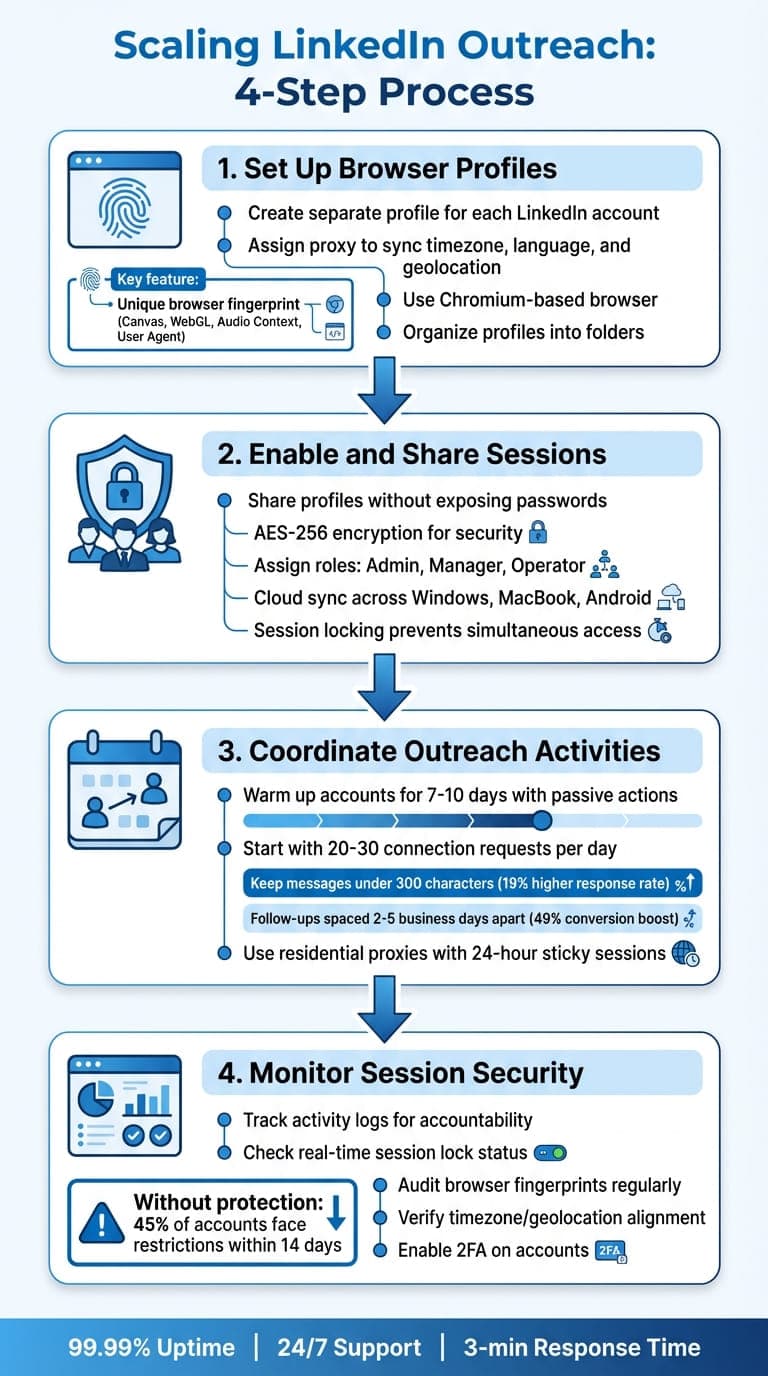
4-Step Process for Scaling LinkedIn Outreach with Session Sharing
Step 1: Set Up Browser Profiles
Start by creating a separate GoUndetected profile for each LinkedIn account. Each profile automatically generates a unique browser fingerprint, randomizing details like Canvas, WebGL, Audio Context, and User Agent. This makes every account appear as though it's being accessed from a completely different device.
Before opening any profile, assign a proxy. This syncs the timezone, language, and geolocation with the proxy's IP address, ensuring your browser metadata aligns with your IP. Skipping this step could alert LinkedIn's security systems. Use the built-in Chromium-based browser to mimic typical Chrome user behavior. You can also organize profiles into folders for better client segmentation.
For managing multiple profiles, take advantage of the bulk management feature. This allows you to create, rename, or edit dozens of profiles with a single click, streamlining the setup process.
Once your profiles are ready and proxies are assigned, you can securely share sessions with your team.
Step 2: Enable and Share Sessions
Share profiles with your team without exposing LinkedIn passwords. GoUndetected uses AES-256 encryption to keep profile data secure during collaboration. Assign roles within the platform: Admins handle profile creation, Managers control access, and Operators use the profiles for outreach.
With cloud synchronization, team members can access profiles seamlessly across devices, whether it's a Windows laptop, MacBook, or Android app. The session locking feature ensures no two people access the same profile at the same time, preventing conflicts. This real-time visibility into profile usage keeps operations smooth and secure.
After setting up shared sessions, the next step is to organize LinkedIn outreach activities safely and efficiently.
Step 3: Coordinate Outreach Activities
Once your team has access to shared profiles, careful coordination is key. Begin by warming up each LinkedIn account for 7–10 days with passive actions like viewing profiles and engaging with posts. This gradual activity builds account credibility and aligns with LinkedIn's algorithms for natural behavior.
When you start outreach, keep daily limits low - 20–30 connection requests per day - and increase gradually to avoid detection. Spread your team’s activity across different times of the day and vary the types of interactions. Combine connection requests with actions like post engagement, InMail messages, and profile views. Keep messages concise; LinkedIn messages under 300 characters see a 19% higher response rate. Sequenced follow-ups spaced 2–5 business days apart can boost conversions by 49%.
To maintain login consistency, use residential proxies with "sticky" sessions that hold the same IP for up to 24 hours. Rotate proxies weekly to mimic natural location changes without drawing attention.
Step 4: Monitor Session Security
Monitoring is essential to keep your LinkedIn outreach secure and compliant. Use GoUndetected's activity logs to track who accessed which profiles and when. This ensures accountability and helps you identify any unusual activity quickly. Before launching a profile, check the real-time session lock status to confirm no one else is using it.
Regularly audit browser fingerprints with tools like BrowserLeaks or PixelScan to ensure consistency and avoid mismatches. Check that each profile's timezone, language, and geolocation still align with the assigned proxy to prevent "timezone drift" flags. Without proper browser protection, over 45% of LinkedIn outreach accounts face restrictions within the first 14 days.
Finally, enable two-factor authentication (2FA) on both your GoUndetected and LinkedIn accounts for added security. With 99.99% historical uptime supported by AWS and Google Cloud, the platform ensures your sessions remain stable and accessible whenever your team needs them.
GoUndetected Pricing Plans
GoUndetected has three subscription tiers tailored to different LinkedIn outreach needs. Here's a closer look at each plan:
The Basic Plan, priced at $39/month, includes 50 browser profiles and 24/7 expert support. It’s a great fit for solo professionals managing a smaller number of LinkedIn accounts. This plan offers single-user access with cloud sync for seamless usage.
Next up is the Team Plan, available for $69/month. This tier supports 200–500 profiles, making it ideal for collaborative efforts. It allows team member additions, profile organization using smart folders, and session locking to avoid password sharing or login conflicts. These features are designed to streamline teamwork and improve efficiency.
At the top of the range is the Agency Plan, which costs $699/month. This plan provides unlimited profiles and advanced tools for large-scale LinkedIn operations. It includes a dedicated Slack channel for support and detailed role-based controls (Admin, Manager, Operator). It's perfect for agencies handling high-volume lead generation.
Plan Comparison for Teams
Feature | Basic Plan | Team Plan | Agency Plan |
|---|---|---|---|
Monthly Price | $39 | $69 | $699 |
Number of Profiles | 50 | 200–500 | Unlimited |
Team Members | No | Yes, customizable | Yes, customizable |
Session Sharing | Not supported | Yes (Smart Folders) | Yes (Smart Folders) |
Cloud Sync | Yes | Yes | Yes |
Support Type | 24/7 Expert Support | 24/7 Expert Support | Dedicated Slack & Personal Support |
Security | AES-256 & Anti-detect | AES-256 & Session Locking | AES-256 & Activity Logs |
No matter the plan, all subscribers benefit from AES-256 encryption, unique browser fingerprints, a high-performance API capable of 1,200 requests per minute, and 99.99% uptime powered by AWS and Google Cloud. Plus, with an average support response time of under three minutes, help is always just a moment away.
Conclusion
After diving into the practical aspects and standout features of session sharing, it's evident that scaling LinkedIn outreach can be both efficient and secure. There’s no need to risk account bans or compromise safety. With GoUndetected's session sharing, teams can seamlessly manage multiple LinkedIn profiles while maintaining distinct digital fingerprints and secure environments to avoid detection.
Consider this: over 45% of LinkedIn outreach accounts without browser protection face restrictions within just 14 days of activity. And when a single restricted account could mean more than $1,000 in lost opportunities, the stakes are high. GoUndetected tackles these challenges by masking over 50 browser parameters, enabling password-free team access, and preventing conflicting actions across sessions.
Whether you're a solo professional managing dozens of profiles or an agency handling unlimited accounts, GoUndetected’s cloud synchronization and detailed permission controls let your team operate from anywhere without raising LinkedIn’s security alarms. Plus, with AES-256 encryption and dedicated proxy support, your outreach efforts stay protected.
Take control of your LinkedIn outreach and protect your ROI with GoUndetected's advanced session sharing features.
FAQs
How does session sharing help protect LinkedIn accounts from being banned?
Session sharing safeguards LinkedIn accounts by ensuring each profile looks like it’s being operated by a genuine, individual user. It does this by assigning unique browser fingerprints, IP addresses, and browsing habits to every account.
By imitating authentic user behavior and steering clear of detectable patterns that LinkedIn’s algorithms might see as unusual, session sharing helps lower the chances of being flagged or banned - even when managing several accounts on various devices.
How can GoUndetected help scale LinkedIn outreach safely?
GoUndetected provides robust tools to help you expand your LinkedIn outreach while keeping your accounts safe from detection or bans. By assigning each LinkedIn profile a unique browser fingerprint, it ensures every account looks like a real, individual user. Customizable settings - like user agent, timezone, and screen resolution - further reduce the chances of LinkedIn flagging your activities.
Key features such as IP cloaking, proxy support, and encrypted sessions allow you to securely manage multiple accounts on any device. For teams, the platform offers safe session sharing, enabling seamless collaboration without compromising sensitive login information. Whether you're an outreach specialist, social media manager, or recruiter, GoUndetected provides the tools you need to scale your efforts securely and efficiently.
How can teams securely manage multiple LinkedIn accounts?
Teams can securely manage multiple LinkedIn accounts by leveraging specialized tools like anti-detection browsers. These tools create isolated environments for each profile, assigning unique browser fingerprints, enabling IP cloaking, and ensuring encrypted sessions. This setup makes each account appear as an independent, authentic user, helping avoid detection by LinkedIn's monitoring systems and minimizing the risk of bans.
For safe team collaboration, features like cloud sync and proxy support let members manage accounts from various devices without compromising sensitive data. By pairing these tools with smart practices - such as using dedicated IP addresses, gradually warming up accounts, and following LinkedIn's rules - teams can scale their outreach efforts securely and effectively.
Browse Undetected. Stay Private.
Unique browser fingerprints, built-in proxy support, and anti-detection technology. Try GoUndetected free for 7 days.
Available for macOS and Windows · No credit card required