
Ultimate Guide to Browser Fingerprinting for Freelancers
How browser fingerprinting links accounts, why common fixes fail, and practical steps freelancers can take to isolate profiles, sync proxies, and avoid bans.

Ultimate Guide to Browser Fingerprinting for Freelancers
Browser fingerprinting is a method websites use to track and identify your device based on its unique configuration, like screen resolution, fonts, GPU, and more. For freelancers managing multiple accounts, this can lead to account bans when platforms detect shared fingerprints across profiles. Tools like VPNs or Incognito mode don’t fully protect against this, as they leave key data exposed.
Key Points:
- Browser fingerprints are created using 50–200 technical details with 99% accuracy.
- Platforms like Facebook, Amazon, and Upwork use fingerprinting to detect multiple accounts.
- Clearing cookies or using Incognito mode does not stop fingerprint tracking.
- Inconsistent data (e.g., mismatched IP and timezone) can raise red flags.
Solution:
GoUndetected, an anti-detection browser, helps freelancers by creating isolated browser profiles with distinct fingerprints. It masks over 50 parameters, syncs proxies, and ensures profiles operate independently, reducing detection risks. Plans start at $39/month, with features like team sharing, API automation, and mobile support.
Why It Matters:
Freelancers can protect their accounts, avoid bans, and manage client operations securely with tools designed to bypass fingerprint tracking.
Browser Fingerprinting Masterclass: How It Works & How To Protect Yourself
How Browser Fingerprints Work and Detection Risks
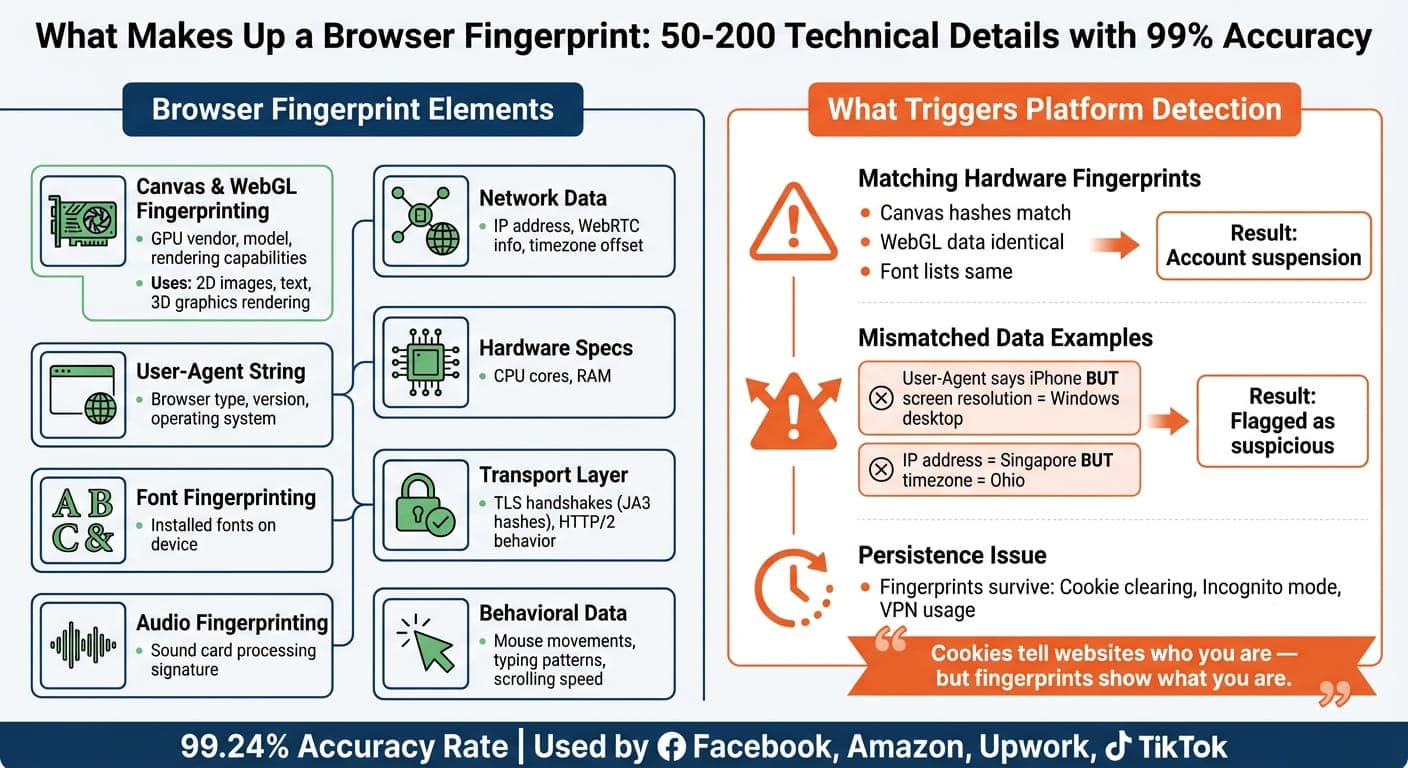
Browser Fingerprinting Components and Detection Methods Comparison
What Makes Up a Browser Fingerprint
A browser fingerprint is essentially a collection of 50 to 200 technical details that websites gather using JavaScript and network signals. When these details are combined, they can uniquely identify your device with an accuracy of 99.24%.
Key elements of a fingerprint include Canvas and WebGL fingerprinting, which exploit subtle variations in how your graphics card and drivers render 2D images, text, and 3D graphics. This reveals information like your GPU's vendor, model, and rendering capabilities. The User-Agent string adds details about your browser type, version, and operating system, while font fingerprinting examines the fonts installed on your device.
Another component is audio fingerprinting, which measures how your sound card processes audio signals, creating a unique signature based on your hardware. Network-related data such as your IP address, WebRTC information (which can expose your real IP even if you're using a VPN), timezone offset, and hardware specs like CPU core count and RAM also contribute to your fingerprint.
Modern detection methods go beyond JavaScript. Platforms analyze transport-layer data, such as TLS handshakes (via JA3 hashes) and HTTP/2 behavior, even before any webpage code runs. Behavioral data, like mouse movements, typing patterns, and scrolling speed, is also monitored to identify human users and track sessions. These combined elements allow platforms to link multiple accounts by matching fingerprints.
How Platforms Detect Multiple Accounts Through Fingerprints
For freelancers juggling several accounts, browser fingerprinting poses a serious challenge. Platforms leverage these technical markers to flag and link accounts, which can lead to account suspensions or worse.
Companies like Facebook, Amazon, Upwork, and TikTok rely on fingerprinting to detect users managing multiple accounts. When two accounts share similar hardware fingerprints - such as matching canvas hashes, WebGL data, or font lists - their systems flag them as connected. This can result in immediate action, including account suspensions.
Platforms also look for mismatched data as a red flag. For instance, if your User-Agent suggests you're on an iPhone, but your screen resolution and fonts align with a Windows desktop, or if your IP address is from Singapore while your browser's timezone is set to Ohio, these inconsistencies raise suspicion.
"Cookies tell websites who you are - but fingerprints show what you are." - GeeLark
For freelancers, the risks are steep. A single fingerprint match can lead to suspended accounts, payment processor restrictions, and damaged client relationships. Unlike cookies, which can be deleted, fingerprints persist across sessions. Clearing your cache, using Incognito mode, or even a VPN won't change the hardware signature that identifies you. This persistence is by design, aimed at preventing fraud, enforcing account limits, and stopping "account farming".
Ironically, trying to hide your fingerprint can backfire. Using browser extensions that only modify certain details, like the User-Agent, without aligning related parameters, or employing tools that randomize your fingerprint for every session, can make you look suspicious. Platforms expect consistent fingerprints from real users over time, so erratic changes may appear as an attempt to outsmart the system.
How GoUndetected Prevents Fingerprint Detection
GoUndetected is an anti-detection browser designed to tackle the fingerprinting challenges freelancers face when managing multiple accounts. It creates a unique and realistic fingerprint for each browser profile by masking and randomizing over 50 browser parameters. These include Canvas, WebGL, Audio Context, Fonts, Screen Size, User Agent, CPU Cores, and Memory settings. Each new profile is automatically assigned a distinct fingerprint, ensuring complete isolation - cookies, local storage, and fingerprints don’t carry over between sessions. This fingerprint management is further strengthened by proxy synchronization, ensuring consistency across various profiles.
One standout feature is proxy synchronization. By assigning a proxy, the browser automatically aligns settings like timezone, language, and geolocation. GoUndetected supports multiple proxy types, including HTTP, HTTPS, SOCKS4, and SOCKS5, with built-in testing and auto-failover functionality.
Built on the latest Chromium engine, GoUndetected offers a familiar Chrome-like experience paired with advanced anti-detection tools. The platform ensures 99.99% uptime by using AWS and Google Cloud for load balancing, while all profile data is protected with AES-256 encryption - meeting bank-grade security standards. For freelancers managing accounts on behalf of clients, the Team Sharing feature lets you grant access to team members without exposing login credentials.
GoUndetected Features for Freelancers
GoUndetected offers a range of features designed to address detection risks and ensure that every profile remains distinct and undetectable. These tools are particularly useful for freelancers working across platforms like Upwork, LinkedIn, Facebook, and Instagram.
The browser’s advanced spoofing technologies protect against detection methods like Canvas and WebGL fingerprinting, which platforms often use to identify GPU and graphics drivers. GoUndetected generates unique signatures for every profile while also masking Audio Context fingerprints. It can even emulate mobile device fingerprints, an essential feature for managing accounts on mobile-first platforms like TikTok and Instagram.
Freelancers can also save time with 1-click bulk actions, allowing them to create, rename, or edit profiles in seconds. The high-performance API supports up to 1,200 requests per minute, enabling seamless automation through tools like Selenium, Puppeteer, or Playwright. Additionally, residential and mobile proxies in over 100 countries ensure that each profile’s location aligns with its target market.
Feature | GoUndetected Capability |
|---|---|
Fingerprint Parameters | 50+ (Canvas, WebGL, Audio, Fonts, etc.) |
Encryption | AES-256 |
Browser Engine | Latest Chromium |
Proxy Support | HTTP, HTTPS, SOCKS4, SOCKS5 |
Automation | RESTful API (Selenium, Puppeteer, Playwright) |
Mobile Support | Android Application & Mobile Fingerprints |
GoUndetected also simplifies profile organization with a drag-and-drop interface, allowing users to group profiles into smart folders based on projects or niches. For support, the platform provides 24/7/365 customer assistance, promising responses within three minutes.
What Freelancers Gain from Using GoUndetected
The technical features of GoUndetected translate into practical advantages for freelancers. By minimizing fingerprint linkage risks, the platform helps protect your operations from detection.
The most immediate benefit is avoiding account bans and suspensions. Freelancers can manage multiple accounts without triggering the security systems of various platforms. GoUndetected profiles launch quickly and use realistic fingerprints that pass detection, unlike resource-intensive virtual machines that are easier to flag. For agencies, features like role-based permissions and session locking ensure smooth collaboration when multiple team members need access to the same client accounts.
GoUndetected offers three pricing tiers:
- Basic: $39/month for 50 profiles
- Team: $69/month for 200 profiles with team access
- Agency: $699/month for unlimited profiles and dedicated support
A 7-day free trial is available, with no credit card required.
Setting Up Anti-Detection for Your Freelance Work
Creating Separate Browser Profiles for Each Account
GoUndetected makes it easy to create new browser profiles with unique fingerprints, masking over 50 parameters like Canvas, WebGL, Audio Context, Fonts, and WebRTC. This ensures that each account operates independently, reducing the risk of detection.
Pair each profile with a dedicated proxy to sync details like timezone, language, and geolocation. This creates a consistent digital identity. Before using the proxy, test its status to ensure it’s active and avoid triggering blacklists.
For added security, emulate an operating system that matches your actual hardware - for example, run macOS if you're on a Mac. This alignment prevents discrepancies that might raise red flags. If you're managing existing accounts, import cookies using a cookie manager (in JSON or Netscape format) to bypass login challenges. To make your profile appear more authentic, build a browsing history by visiting 10–15 reputable sites, like Amazon or The New York Times.
"If you are running more than two LinkedIn accounts from a standard Chrome or Safari browser, you are leaving a 'digital breadcrumb trail' that leads straight to a permanent ban." - Proflayer
By following these steps, you can set up a secure environment for managing multiple accounts.
Managing Multiple Accounts Safely
Once you've established isolated profiles, maintaining consistency with proxies and session management is key to staying undetected. Always pair each profile with its designated proxy, as switching IP addresses mid-session can trigger security alerts. GoUndetected’s Smart Folder feature helps organize profiles by project or client, making account management more efficient.
For team collaboration, use the Team Sharing feature with session locking. This allows others to access profiles without revealing credentials or risking simultaneous logins. If you work across multiple devices, such as switching from a laptop to a desktop, Cloud Profiles ensure your sessions remain active and accessible.
With 99.99% uptime supported by AWS and Google Cloud, your profiles will always be available when you need them.
Conclusion
Browser fingerprinting can uniquely identify devices, putting freelancers at risk when juggling multiple accounts. Tools like VPNs or Incognito mode don't address the root issue - they leave key device parameters exposed. If one account gets flagged, it can lead to all your profiles being linked and potentially suspended, threatening your livelihood.
To tackle this, you need a dependable solution. GoUndetected offers isolated browser profiles, each with its own unique fingerprint. By pairing this with advanced proxies and session management, it ensures that every account operates as if it were on a separate device. This keeps your accounts safe and lets you manage them with peace of mind.
"The level of anonymity is unparalleled. I can manage multiple client accounts without ever worrying about being traced. A game-changer for my agency." - Verified User, GoUndetected
This testimonial highlights how effective the platform is for maintaining privacy and security.
Whether you're managing just a few accounts with the Basic plan at $39/month or handling an agency's workload with unlimited profiles for $699/month, investing in advanced anti-detection technology is key to safeguarding your privacy and keeping your business running smoothly.
FAQs
Is browser fingerprinting legal in the U.S.?
Browser fingerprinting is allowed in the U.S., but it comes with its share of privacy concerns. Companies can use it legally as long as they adhere to data privacy laws. Ensuring that data collection methods comply with these regulations is crucial to avoid any legal complications.
How can I tell if my accounts were linked through fingerprinting?
Look out for clues like sudden account restrictions, suspensions, or bans across various platforms. You might also notice repeated verification requests, unexpected logouts, or persistent issues even when using different IP addresses or cookies. Platforms often connect accounts by analyzing over 50 unique parameters, including WebGL, Canvas, and hardware details. To avoid these linkages, consider using tools that generate distinct browser fingerprints. However, if problems persist, it could mean the fingerprinting methods are effectively identifying and linking your accounts.
What proxy setup is safest with GoUndetected profiles?
Assigning a unique proxy to each profile is the most secure setup. Opt for high-speed datacenter proxies located close to your target areas for optimal performance. To maintain reliability, enable auto-failover features, ensuring smooth operation even if a proxy fails. Additionally, ensure the proxies support multiple types such as HTTP, HTTPS, SOCKS4, and SOCKS5. This method reduces detection risks while providing consistent and stable performance.
Browse Undetected. Stay Private.
Unique browser fingerprints, built-in proxy support, and anti-detection technology. Try GoUndetected free for 7 days.
Available for macOS and Windows · No credit card required